A few days back, a client came to me and told me that he was having trouble with his Windows XP. The show hidden files and folders was not working at all. If he selected the radio button “Show hidden files and folders”, and then press Ok .. the changes would just disappear upon opening the dialog again. It was probably some virus attack after which the Windows registry was not being updated properly. So here is what I did to restore it back. There are so many methods to restore back the registry. If one method is not working, please try another one.
Method 1:
Go to registry editor by running regedit in the run box.
Go to this key:
HKEY_CURRENT_USERSoftwareMicrosoft
WindowsCurrentVersionExplorerAdvanced
In the right hand area, double click hidden and change the value to 1.
Now you’re all set to go. Check it in your tools menu if the changes have taken effect.
Method 2: (By Random Hajile)
1. Click “Start” -> “Run…” (or press Windows key + R)
2. Type “regedit” and click “Ok”.
3. Find the key: HKEY_LOCAL_MACHINESOFTWAREMicrosoftWindowsCurrentVersionExplorer
AdvancedFolderHiddenSHOWALL
4. Look at the “CheckedValue” key… This should be a DWORD key. If it isn’t, delete the key.
5. Create a new key called “CheckedValue” as a DWORD (hexadecimal) with a value of 1.
6. The “Show hidden files & folders” check box should now work normally. Enjoy! 
Method 3: (By Denny)
1- Click Start –> Run –> regsvr32 /i browseui.dll –> enter
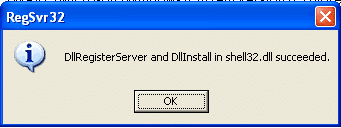
A confirmation message will appear like given below
2- Click Start –> Run –> regsvr32 /i shell32.dll
Wait for the confirmation and click OK.
Method 4:
If none of the above methods work, please download our Smart Virus Remover from here:
Smart Virus Remover (889.9 KiB, 851,756 hits)
Using this Virus Remover please restore your Windows settings and your show hidden files and folders will be set to default.Please spare a few moments from your precious time and tell us about your experiences.

Ali Mohsin
Salaam
how are u and howz ur health kia hoo raha hai bahi
Thankz 4 Hidden Folder Option, aik aur kaam kar deen yaaar yahoo ka Account Delete kar saktaa hain and …
?
Sanix
Ali Mohsin, please don’t pour personal questions here. You may ask them through email.
Sanix
Yes, yahoo account can be deleted. This webpage explains everything
Ali Mohsin
ok bahi plz send me Link and tell me how i can delete yahoo and hotmail Account ?
Howz ur health Buddy ?
Ali Mohsin
oh thankz bhi Jaan u r Gr8
Daman n Adi
Thanksssssss Bhaiiiiii….
Ur solution worked!!!
U rock !!!
Thnks again
Sanix
Great !! atlast someone got help from my article. Daman n Adi you are always welcome to ask any question related to IT. We will be glad to sort out your problem.
Omer T. Syed
Nice website. Keep up the good work.
Bapi
Hi!
I tried doing that. But the problem still remains.
I am able to change the status to “Show hidden files and folders” and apply the changes. But it doesn’t save it.
So next time when I open Folder Option, its again “Do not show hidden files and folders”.
Sanix
You can apply the above registry tweak to show hidden files and folders permanently..
Khurram
Hi Sanix, its really good to find out the solution for that problem, thanks n regards, khurram
Dj Flush
The solution really works great. Indeed I am very much delighted to know how the bloggers of Pakistan are emerging. I am a Professional Technology Blogger from Islamabad. I started blogging in 2007 Jan and am more like a professional in this field now. Do check my blog and keep up the good work.
sharad
thanks for the reply but it does not solve the problem.it again goes to do not show files. although i have scanned with th eantivirus.
GP
Yes, it works perfectly. Many Thanks and good luck . GP-INDIA
Amit
In one of my clien’s XP changes in Registry is also not save and take effect for Hidden folder option. Now What?
Sanix
Thanks Khurram for the compliments, I will try to add more useful content to the blog as soon as I keep getting more spare time from my job.
Dj Flush, your site is really very good. I’ve added it to my feeds reader so that I may check back regularly. Yes it’s really sad to know that not much of the people from Pakistan write technical blogs. But I hope that more people will start blogging once the advantages of blogging become more like “public”.
sharad have you restarted your explorer after applying the registry tweak?
GP, glad to see you happy. Keep visiting.
Amit, have you scanned from viruses and spywares online? If not, please do a virus scan so that all the traces of the infecting virus can be removed and then apply the registry tweak. It should save and immediately take effect.
Hrishikesh
Thank You very much for the Trick, dude. You are GREAT.
shabahat
the value gets back to 0 even if you change it to 1
Sanix
shabahat, probably the virus is still there in your system. Try to scan your system using online virus scanner and then see our post about killing the ravmon virus here.
Zahid Ullah
The show hidden files and folders isnot working at all. If Iselected the radio button “Show hidden files and folders”, and then press Ok .. the changes would just disappear upon opening the dialog again. It was probably some virus attack after which the Windows registry was not being updated properly. So here is what I did to restore it back.
I have tried all the possible solutions as prescirbed on this website, but still the problem persists. Now what should I do.
Qaiser
i go in the regedit and did all the setting as u mentioned but hidden folders still not working then i install ravmon.exe but the problem is still there.plz tell me some other solution to unhide my hidden folders.
tahir
my run icon is disable .. its work in save mood but when i typed ther regedit its not working .. so what to do can you solve my problem
Random Hajile
If anyone’s still having trouble, here’s a fix that worked for me after I got the RavMon virus:
1. Click “Start” -> “Run…” (or press Windows key + R)
2. Type “regedit” and click “Ok”.
3. Find the key: HKEY_LOCAL_MACHINESOFTWAREMicrosoftWindowsCurrentVersionExplorerAdvancedFolderHiddenSHOWALL
4. Look at the “CheckedValue” key… This should be a DWORD key. If it isn’t, delete the key.
5. Create a new key called “CheckedValue” as a DWORD (hexadecimal) with a value of 1.
6. The “Show hidden files & folders” check box should now work normally. Enjoy!
Sanix
Thanks Random Hajile for sharing your experiences… People share your experiences so that others can benefit from yours..
Zahid Ullah
Dear Random Hajile, I am very thankful to for providing this solution. The problem is solved now. and the folder options are now working now. Now I can see unhide files.
Thank you once agian.
Ali Malik
Random Hajile…Xcellent!!!!…thank u for the insightful and helpful information…all systems are GO!
Zahid Ullah
Hello Dears;
How to disable “Folder Options” in win98. It can be disabled in winxp when to type gpedit.msc in run.
ExE
thanks Sanix & Random Hajile
Nando
Hi!
I have this hidden files problem. I tried you solution but it didn’t work. The hidden files doesn’t appear and, the registry continues with the 0 value, even after I change to 1.
someone has any ideas?
thanks
Muhammad Rizwan
Well Thx everybody 4 ur valuable comments and solutionz
it is such a nice and constuctive platform 2 helpout persons all over the world
1c again thx alot
Muhammad Rizwan
dear all,
can sum body hep me out now a days i m facing a prob wid my laptop. “it has slowed down alot”, i hav installed 2 antivirus softwares “kaspersky & AVG 7.5″ to make my laptop secured from various viruses.
and another prob that i installed 1 softwre called “sony ericcson PC suite” i unintendly uninstall the software through “windows installer cleanup” now its not showing in control pannel but its icon remains on desktop and sumtym ven i start my pc it shows the messge of corruption of software kndy if sum body has any idea then help me out for both of my probs
thx n luking forward
Muhammad Abdullah
Lohith, probaby your system is infected with any virus.Try to scan your system using online virus scanner and then see our post about killing the ravmon virus here. and download the patch
Lohith
Hai,
This is Lohith from india..Actually my laptop was infected with Trojan downloader DLF.LM..Now it is removed..But show hidden files option not working…What ever you suggested i have done but its not working..Please kindly help me in this matter
Sanix
Thanks everybody for taking time to comment here and sharing your valueable experiences. For those who are still in trouble even after the tweaks mentioned in the post, it seems like you people have not scanned your system for viruses and the virus keeps on activating itself after you cancel its effect. So I would recommend a thorough virus scanning of your system before applying the tweaks above.
Muhammad Rizwan, I would recommend you should always use only one antivirus for optimum performance. And secondly, the software you removed has probably not removed itself from the system startup. Go to Run –> msconfig –> startup .. and uncheck the program if it exists to stop it from starting on startup. And the desktop icon will only be a shortcut so it would be safe to delete it.
Muhammad Rizwan
thx buddy for ur valuable recommendation.
but wht i m facing is that its not showing in startup and also the desktop icon is not deleted i dun knw y?
well
and u recommend taht i shud keep 1 antivirus ok then ca u recoomend any1 which ca really help me out.
Muhammad Rizwan
well i hav got 1 new prob, “task manager” has been disabled by administrator msg is showing ven i press cntrol+alt+del button in order to stop any runnig application+process.
i hav run Lavasoft adaware s/w but its not working, kindly tell me the solution
ishan
absolute solution, keep up the good work.
Amar
Thanks Sanix, the patch worked fine. I have AVG 7.5 that checks for updates daily and does a full system scan after that. Even then, it didn’t detect the virus. I believe that my USB thumb drive is the culprit. Is there any other way in which I can scan my whole PC including my thumb drives? I haven’t used my thumb drives on my PC while and after running the patch.
Sanix
Muhammad Rizwan, you can see my latest post about enabling task manager for your solution:
http://technize.com/2007/06/27/task-manager-has-been-disabled-by-your-administrator/
jss
Sanix-
thank you thank you for the regedit. Saved me!
Amorak
Dear Sanix,
I edited my registry (Hidden through your simple and detailed instructions) twice but my radio button is still stuck on “Do not show files”.
Do you know any other way around it?
jack
it worked ravmon virus killer is gr88888888888
thanks a lot
Anand
Hey thanks dude.. your solution was quite helpful… irritating hours of searching and scanning were reduced to a couple of minutes.. yours was the first google search result. thanks a bunch man.
Anand
jayesh
in winXP pack2 in tools menu the ” folder option ” is noty display… help me..
vivek
hi,
thanks for the suggestion.. but it does not work for me…
i did the exact procedure what u said.. but after i change the value to 1 and go to explorer to change the settings to view hidden files and folder, the settings in the registry changes back to 0..
plz help me…
thanks,
vivek
padmanabha
I am having trouble with my Windows XP. The show hidden files and folders was not working at all. If i selected the radio button “Show hidden files and folders”, and then press Ok .. the changes would just disappear upon opening the dialog again. I had tried on u r suggestion but it is not working again
Pranay Gohel
Hi there,
I m facing the saem problem & I tried your solution but it din’t workout. Do you’ve any other option ? pls let me know.
thanks..
amit kumar gupta
Dear Concern,
I have done your excersize but my problem has not be resolve kindly assist me if passible kindly provide me your no also.
ajmal
thank
David
In fact I have another Problem. I did in the past choose to hide some files, and now the option allowing me to uncheck the “Hidden” can’t be clicked anymore! Anyone know what I can do about this?
Regards to all
ravi
Thanks a lot for your post…
the solution worked .. hurray[:)]
gbert
Just Add This to your Registry to fix it
Windows Registry Editor Version 5.00
[HKEY_LOCAL_MACHINE\SOFTWARE\Microsoft\Windows\CurrentVersion\Explorer\Advanced\Folder\Hidden]
“Text”=”@shell32.dll,-30499″
“Type”=”group”
“Bitmap”=hex(2):25,00,53,00,79,00,73,00,74,00,65,00,6d,00,52,00,6f,00,6f,00,74,\
00,25,00,5c,00,73,00,79,00,73,00,74,00,65,00,6d,00,33,00,32,00,5c,00,53,00,\
48,00,45,00,4c,00,4c,00,33,00,32,00,2e,00,64,00,6c,00,6c,00,2c,00,34,00,00,\
00
“HelpID”=”shell.hlp#51131″
[HKEY_LOCAL_MACHINE\SOFTWARE\Microsoft\Windows\CurrentVersion\Explorer\Advanced\Folder\Hidden\NOHIDDEN]
“RegPath”=”Software\\Microsoft\\Windows\\CurrentVersion\\Explorer\\Advanced”
“Text”=”@shell32.dll,-30501″
“Type”=”radio”
“CheckedValue”=dword:00000002
“ValueName”=”Hidden”
“DefaultValue”=dword:00000002
“HKeyRoot”=dword:80000001
“HelpID”=”shell.hlp#51104″
[HKEY_LOCAL_MACHINE\SOFTWARE\Microsoft\Windows\CurrentVersion\Explorer\Advanced\Folder\Hidden\SHOWALL]
“RegPath”=”Software\\Microsoft\\Windows\\CurrentVersion\\Explorer\\Advanced”
“Text”=”@shell32.dll,-30500″
“Type”=”radio”
“ValueName”=”Hidden”
“DefaultValue”=dword:00000002
“HKeyRoot”=dword:80000001
“HelpID”=”shell.hlp#51105″
“CheckedValue”=dword:00000001
prakash
Hi all,
i had installed a mcafee anti virus software few weeks back, due to some problem i was unable to uninstall it properly. So myself i have removed it manually.
Now i am unable to use mcafee with full function. Even unable to install it completly.
any solution for this?
prakash
Hi everybody
i too have this show hidden files problem.
i have tried everything. when i change hidden value in registry. radio buttons of show hidden files and do not show files are unselected. After changing registry value, If i click show hidden files and click apply, It goes back to the default “Do not show”. changes would just disappear.
gbert
uhmmmmmmmmm………Try removing the virus(or what so ever that’s interfering with your registry) before doing any registry modification
prakash
Hi all,
Please help me out from this.
i had installed a mcafee anti virus software few weeks back, due to some problem i was unable to uninstall it properly. So myself i have removed it manually.
Now i am unable to use mcafee with full function. Even unable to install it completly.
any solution for this?
Angel - Ahmed ---> l8l_Angel_l8l@yahoo.com
Hi All i come here today coz i was have abad proplem And i Find teh solution here posted by Random Hajile i cant go without say thx alot for your hep …
i wanna say somthing for all that kasper sky and avg is not the best antiviruses there is McAfee 8.5 + Anti SpyWare i used It Right Now It’s Really Good But You Have To Download the last update to see that it’s the best One .. Alot Of Kiss For All
For Contacting ===> l8l_Angel_l8l@yahoo.com <=== i am ready to help any one thanx all
asif
hi. i tried above solution but if i restart my computer the again not able to see hidden file …pls if can help me
asif
hi.. i tried ur solutio on “not albe to show hidden file ” but if i restart my computer it again return to intial condition…pls help me
Zahid Ullah
Dear friends;
I have 2 questions from you:
(1): I deleted the entire folder of the Acrobat 8.o from my computer. In normal way, It could not unintalled so I deleted all the files associated with Acrobat 8.0. It is still present from Add/remove programs. The problem is, when I clik on the right button of mouse on any file/folder, windows intaller opens and searching for the Acrobat 8.0. How to fix this problem.
(2): How to change the drive letter of a drive/cd-drive.and also to change the name of the CD-Drive.
Jeeva
That was awesome. Thanks for the solution
Ilyas
Thanks for the information. Now I am able to see hidden folders.
Thanks
Ilyas
Alejandro
Thanks alot Random Hajile, really appreciate your help.
Ajay
Thanks this works
jagdish
its not working
wat to do now
pls help
its urgent
Saquib Haider
Hey friends, gud to see urdu being used on a forum
yaar i have the same problem that u just gave the solution for..that is hidden files option not working..i tried searching for the “hidden” key in the registry but i couldn’t find it..the virus must have deleted it..please help..i even tried creating one key by that name but it does not work.
Dr-Hack
Hah !!! Stupid RAVMON .. left its aftereffects on my PC
..
Nice to see someone of my own country to be helping out ..
TC
jun
Still not working. Can you help me
priyamaalini
works and thanks a lot . solved my problem
Bob
Not sure where to put this but my computer is loaded with viruses trojans etc. Even after trying out that reg edit thing it still wont show. Tried anti viruses none of them seem to work. The virus i was trying to delete has a hidden folders in C: drive but as i cant show them I can’t delete them. Other side effets of the virus/s are unable to defrag, when I double click on CL drive it comes up the open with: window. Also occasionaly when I open task manager every time I move my cursor onto it it disapears. When I right click on C: and D: drive strange little symbols are up the top. These vaguely resemble 2Y.A Any help appreciated.
sachin
thank sir for getting my problem solved
CRis
help me Help me
how to get “Hide protected operating system files” back if it missing.
I must check it because there is a autorun.inf in C drive. But “Hide protected operating system files” missing so I can’t view it.
Help me!
??????
hi,
Some really good articles at your blog….!! Congrats..
This msg is to ask you wether or not i can use your articles at my website (www.freedownloadsnlinks.co.nr) ???
Looking forward to a positive response…
Thankx
aj.astron
Thanks Random Hajile..ur suggestion worked!!
cheers!!
tarun songra
thanks Random Hajile
your solution worked….
thanks a lot…
mohammed
thannnnnnnnnks inta 3abkary
Amar
it’s not working in my case. i’ve changed value to “1″ three times, but when i tried to see the view hidden files… the value in registry automatically changed to “2″.
bhai, pls. help me. i am fed up!..
200grade
thank you very much!
this worked perfectly! hope you won’t get tired of helping out other people, again, thank you so much!
meditation
I tried the registry tweak… but its still not working…
sandeep
thank u very much
DEVMUNI
hi,
thanks for your advise, but problem is steel pending, i am trying to solve this problem than i will inform all of you.
hari
don’t u have any other methods .. it didn’t work in my PC
Ax
Dear Random Hajile, thx bro. Now i can delete all those hidden folders i created to check!! Ur a lifesaver.
javad
salam
really i’m thank you for helping me.
javad rezvani
in my computer,user Accounts’s name is different from welcoming screen!!!
what must i do?
Jayatheerthan
Dear Sir,
thank u very much.. now i can able to c all the folders at my drive..
Have a g8 day,
S.Jayatheerthan
Capablanca
Thanks, that worked.
Nazim
Just a one word to describe ya ………. Superb
Drazan
Thank You guys a lot, you solved a big problem ….
Frank
Thanks a ton dude. It cracked it. Lobely
sandesh
thank u dude but we should change the setting always dude…… plz find out tell?
BlueFairy
hi all
can any one help me here.
i want to se hidden files.in my VIEW tab in Folder options, I cannot find the “hidden files and folder” option. can any one dig their head for me,
thanks
Shaz
Deepak
It’s a very good advice for all the people who are facing this problem.
Thanks for this solution.
Deepak
Ezzat Muhammad
dear all
my be we need any windows utilities or program or anti virus which is fixing all these problem any body have this program or solve thanks by
yaz
it didnt work iguess its some kind of a virus that should be removed
Muhammad Junaid
thanks Muhammad Abdullah,
I got the folders options error which is now corrected by your help.. thanks…
Allah Hafiz
Daniel
One of my users had the exact same issue.
But in his case the registry values (both CheckedValue for NOHIDDEN and SHOWALL) kept reverting to 0 (zero).
I used RegMon and observed that every couple of seconds EXPLORER.EXE is setting the CheckedValue to 0 (zero).
Using ProcessExplorer I suspended the process EXPLORER.EXE and the updates stopped – I was able to change the value to 1 and it remained 1 after several refreshes with F5.
But with this process suspended the system was unusable, so I resumed it and the updates to 0 started again.
I used HijackThis and found an Autorun entry for C:\WINDOWS\SYSTEM32\AVPO.EXE which turned to be part of a malware – Trojan-PSW.Win32.OnLineGames.blt
I was unable to see if the file still exists (maybe it’s hidden).
He had SAV 10 running but the definitions were more than an year old (6/30/2006) and LiveUpdate completed successfully but didn’t change the date.
I tried several anti-rootkit tools but the only useful one was Rootkit Hook Analyzer – it told me that there are 18 hooks and 3 of them were by WINCAB.SYS which is another malware AKA Infostealer.Perfwo.B
In Command Prompt I searched for -R-H-S files in C:\WINDOWS\SYSTEM32\ and it found the following 3 files:
AVPO.EXE
AVPO0.DLL
AVPO1.DLL
I was able to change their attributes and delete the .EXE files.
So, I used Unlocker and was able to delete the 2 DLLs.
Rebooted the laptop and tested – now the setting in Folder Options stays and everything is back to normal.
So, it was one interesting case – I hope it might help you too…
Daniel
krishna
it is the unique solution for this problem. and it worked perfectly for me.try this urself.
emalik
Hi Sanix, Thanks for such a nice post…This really help lot of people there and also me….Keep it up
sopan Patel
Yes
i solved my problem to change reg vaule
Change registry
HKEY_LOCAL_MACHINE\SOFTWARE\Microsoft\Windows\CurrentVersion\Explorer\Advanced\Folder\Hidden\SHOWALL
CheckedValue set to 1
Imran
thank u very much dear. it really worked by changing the registry key.
regards,
imran hashmi
jeddah – saudi arabia
keshav
Booss it was really fentastic, would not even required to restart my machine. Thanks a lot. God bless
Ariel
Greetings. This tip has helped me really a lot, i was facing this issue for a couple days, i think the problem was due to a virus infection. I got rid of it with AVG free.
Thanks a lot for your time and kindness.
oz
Thanks man ….. thanks
muneer
in folder option dialog box cannot find “hide operating system files
muneer
in folder option dialog box cannot find “hide protected operating system files”
Abdul Basit
This work great, i really appreciate it. thank you for hard work that made life easy for everyone..
rameson
hidden files option not working..i tried searching for the “hidden” key in the registry but i couldn’t find it..the virus must have deleted it..please help..
Tareq Zeyad
i still have the same problem … and it seems the same virus is back …. or its not deleted using your solution … so please help .. help …. thanks
Kai Wang
My computer is attacked by virus. I manually removed them use autoruns. But I could not delete the hidden files. Your solution let me find the hidden files and deleted them. Now the virus seems to be removed. Thanks
Shah Atherr Alam
Bingo!!
Great work Sanix
Bravo!
Gaurav
hello
i really appricated work done by you in regarding to show the hidden files. but i am sorry to say that i does not make any effect on my system. still problem is same, hidden files are not showing again. i would appriciate your feedback if you can provide me the option so i can fix my problem.
thanking you
Rachel
Didn’t work for me.
abdul rauf
i have problem with my hard drive when i open my computer and right click in drive letter they show unknown text format and i dont understand what can i do
Sanix
abdul rauf, you can download ravmon virus killer to remove the unknown text format.
http://technize.com/2007/06/06/ravmon-virus-killer/
shankar
thanxxxx a lot…….had problems with hidden folders…..not anymore…………the software cleared all the problems…
thanxxx a lot for the software
‘ll be looking up to this site a lot from now onwards……..
so keep up the good work
Vikram
Thanx Sanix & Random Hajile. It Worked in my PC. Now i can see my hidden files. Thnx a Lot. And keep doing such posts.
rams
iam very much greatfull to you.
your logic is working fine.
thanx a lot dear.
DAD
Thanks Random Hajile
I already ad dword, but it had a value of “0″, so I changed it to “1″ and voile!
Tanveer khan
Its really work i solved my problem to change reg vaule
Thank You
g.k.balaganesh
my PC is affected by virus.
Jitendra Kumar
Its very Good. Can be remove All Program icon form start menu? if yes then how we can do it?
Gio
Comments number 24… your the man!!!! thank you for your very helpful comments…God Bless
Giovanni Candelaria
Philippines
Faheem
Hy itz faheem here from pakistan, karachi I would definetily like to say some thing about the unhide scripts.
itz really bigg chutyapa just like you guys.
Thanks and regards
Note:- please send me your commnets about ma comment.
Shahab
Thank you
Its working but again reverting back to old condition
Gaurav
My problem is defferent, SHOWALL\CheckedValue in registry is set to 1, but still it show no hidden file option as checked.
can any one help me.
Sanix
Gaurav, please download ravmon virus killer and reset your Windows default settings by running it.
http://technodigits.wordpress.com/2007/06/06/ravmon-virus-killer/
jkreddy
thank u boss…………!
Razi
even its not working please help me!!
godfather
thx man !!!!! it works for me
Sherif
thanks ravmon removal tool helped me a lot
Yosi
Many Many Thank to all of you! I had so many problems with my PC… It was infected by fun.xls.exe and this show hidden files problem came up! So i changed the registry… Now it’s working! Thx again guys…!
rezaei
i have the same problem, i had this event, i insert a flash memory then
to open the default option is one called “auto” if i do doble click it
makes the svohost.exe reapear, maybe its linked to the showing hidden
files problem, i have tried everything to fix it, the svohost.exe its
gone but still no show hidden files
rezaei
I am unable to set “show hidden files and folders”.
I am running XP Professional SP 2. Dell 1GHz Pentium system.
When I go to file option, click view, then click the button:
[x] show hidden files and folders, click apply, click OK.
Than, when I click file option, view, again,
the same button has been remove and enable the button – “Do not show hidden
files and options”.
What did I do wrong? Is there something else I did not do?
Thank you.
ebo
thank you very much!! im going to try it.. i hope it will work…
jk
sir,
actually my problem was solved by using ramvon antivirus………but now it’s showing a different kind of error………just after running the ramvon tool ……..the hidden value again changes to 2(hexadecimal)……….if i click on the radio button of “show hidden folders” and then apply………….nothing happens……..just after closing the folder option window the ” do not show hidden folder is auto matically selected……..i am not able to see my any of the hidden folder…….
PLZ HELP ME!!!!!!!
Benjamin
Random Hajile you are a legend
problemchild
Hi Techs,
Thanksindeed, it worked…. i unfortunately used some crap software to lock the folder….. need to uninstall it
thanks onceagain….
Rizwan
Hi All,
I have very worst problem of “JUNK MAIL”. I have unsubscribed many times from their mailing lists but they keep on sending me that mails. I want to override this all. From this page i have learned that E-mail account can be terminated. and now i need ur help on this.
Would any body (Especially Sanix) please advise
1) Is it possible to re-create the e-mail account with your old ID you terminated.
2) and if I terminate my account for a month of 2, will the “Junk Mail” stop to come my account.
I mean if i terminate my account, would it b possibel for me to re-create my account with the same old ID and would my e-mail account be deleted from all “junk mail” lists.
If there is any other solution please advise.
Many thnx for your kind help.
Regards,
Rizwan
Biju
Hey, this worked beautifully…thanks a lot!
GiangMJ
Thanks Random Hajile, I’ve been looking for this for too long.
Quote by Random:
>>If anyone’s still having trouble, here’s a fix that worked for me after I got the RavMon virus:
>>1. Click “Start” -> “Run…” (or press Windows key + R)
>>2. Type “regedit” and click “Ok”.
>>3. Find the key: HKEY_LOCAL_MACHINE\SOFTWARE\Microsoft\Windows\CurrentVersion\Explorer\Advanced\Folder\Hidden\SHOWALL
>>4. Look at the “CheckedValue” key… This should be a DWORD key. If it isn’t, delete the key.
>>5. Create a new key called “CheckedValue” as a DWORD (hexadecimal) with a value of 1.
>>6. The “Show hidden files & folders” check box should now work normally. Enjoy!
hareesh
when i run regedit in run box its showing popup as registry editig has been disabled by administrator.
and even i cont see the folder options in my system
Vivek Gupta
HI there,
I worked teh same way you told it is working quite well but now teh problem is when i again select do not show hidden files the problem again arises I again have to do it in the same way you told… Can you tell me why this happens, thanks again
Have a great day..
Selvakumar
Thanks a lot.. i helped me in recovering files..
ramesh
ii
mahesh
the problem is hide folder not working
sajith
Thanks man
the registry modification worked
Irfan ullah
Great ! It solved My problem. TNX
ganesh rajan
Excellent posts. Adding those 3 registry entries solved my problem. Now am able to see my hidden files. Thank you.
Deep_Rock
Whenever opening the c drive, d drive it is asking for the program to open, even not able to browse any partition, I have unhide the OS files not able to find any ini file>>>>>>>>>>Please help musta be a virus.
Hash
Hey dude, currently I’m facing a problem, and I’ve tried to use the solutions shows above and other solutions that post …It doesn’t solve my problem here. I’m so sure it’s come from my USB thumb drive. Yet, it infected my computer with some symptons similar as ravmon, just the different is..
I still couldn’t show hidden files, I’ve tried to change the value data to 1 in the Hidden registry, yet..it will automatically switch back to 2 or 0.
Then, bout the drive, whenever I double click on any drive, it will pop up with a new explorer.
In Control Panel -> add and remove files section, it just display alphabet A’s application then the rest was likely blank but yet i can see the space there..means I scroll til the end but showing nothing there..
Can anyone please help me to solve this and I not sure what’s the virus actually. But it’s the same.I can see an auto.inf and a .exe files within my thumb drive at the first time i plug in, then it gone and i couldn show the hidden files anymore. Please Help and Thanks.
S.VAIDYANATHAN
Its very good, Thank u !!
KAKA
Thanks Hajile
vikram
Works like a charm!! – thank you!
Sukanta Jena
Thanks a lot I got my problem solved after changing the registry value in my machine.Thanks again.
Rashid Aziz
Dear
in my PC “show hidden files options dosn’t work” as u told the procedure go to registry edit n change the value to 1. i check the value that was 2 and i changed it to 1 but when i click Ok button the value will go again to 2. i run revmon removal tool also but it doesnt work. when i click on remove virus from harddisk a windows suddenly appears and tell me ur computer have no revmon virus or clean already.plz help me and reply me at my email which i mentioned above.
Rashid Aziz
od3n
using ravmone virus removal tool 3.2, click restore windows default settings. it should works.
Vinod C
OMG thanks so much.. this appears to be affecting South Asian computer networks the most.. not sure why. But the reg edit worked.
Thanks
Vinod C
And almost forgot to mention: Thanks to GiangMJ for his comment on how to make the Radio Button work again: http://technodigits.wordpress.com/2007/05/13/show-hidden-files-and-folders-not-working/#comment-1993
Worked like a charm.
tigerCRO
succesfuly unlocked registry used your tweaks but problem with “show hidden folders” still exsists.now don t know what else to do(have tried everything from this post) win VISTA ULTIMATE X86 running any ideas?
G.Venitus
hi
i tried your removal tool
its worked
thank you
od3n
@tigetCro using ravmone virus removal tool 3.2, click restore windows default settings. it should works.
tigerCRO
thanx od3n but it didn t work on vista(maybe is this tweak xp only).didn t have ravmon virus on my system(according to AVAST,SPYBOT S&D,AD AWARE and RAVMON REMOVAL tool).dont want to format disk,options?
tigerCRO
as i said,didnt have RAVMON,but there was win32:rontokbrl2,win32:rjump,win32:trojan.gen.
tigerCRO
yeah i did it,thanx sanix.bless yos
ashish
hi… there is virus name autorun.inf its 1 kb file it is created in each drive. it gets deleted after 2 secs it is again created … more over hidden files are not working when i click on the show hidden files option and then apply it it doesnt happen it agin goes to dont show hidden files can u help me ….
Art
Random Hajile, on June 22nd, 2007 at 9:08 am Said:
If anyone’s still having trouble, here’s a fix that worked for me after I got the RavMon virus:
1. Click “Start” -> “Run…” (or press Windows key + R)
2. Type “regedit” and click “Ok”.
3. Find the key: HKEY_LOCAL_MACHINE\SOFTWARE\Microsoft\Windows\CurrentVersion\Explorer\Advanced\Folder\Hidden\SHOWALL
4. Look at the “CheckedValue” key… This should be a DWORD key. If it isn’t, delete the key.
5. Create a new key called “CheckedValue” as a DWORD (hexadecimal) with a value of 1.
6. The “Show hidden files & folders” check box should now work normally. Enjoy!
AWESOME THIS WORKED! THE ORIGINAL POST DID NO GOOD FOR MY COMP, KEPT DEFAULTING BACK TO DO NOT SHOW HIDDEN BLAH BLAH BLAH!
Junaid
hello Sanix,
1st of all thankz! because of u i have been able to solve my folder option problem……which previously was not appearing but now its all good. i mean its appearing now.
but now i hve 1 more prblm n hpe to receive ur help. the prblm is : After selecting the “Show Hidden Files and Folders” option. It automatically again goes to “Do not show hidden files and folders”.
I have already gone through ur process but unfortunately that is not working. I have also gone through the post and tried but again all in Vain.
I also tried the ramvon tool option that also didnt work.
i also tried to change the hidden option in the registry but that is also not working i mean i change it to 1 but it automatically becomes 2(hexadecimal). I dunno whats wrong.
Can u please help me out Sanix……. i will b very thankfull to u…. hpe to get ur reply soon….
Please help me!
Sanix
Junaid, please scan your computer with an uptodate antivirus. Looks like you’re having a virus that’s not being removed. Without it being removed, you’ll not be able to restore your default settings. After the scan you can restore the settings with Ravmon Virus Killer.
Please see some of the online virus scanners here:
http://technize.com/2007/06/27/free-online-virus-scanners/
K.G.
Hey, I tried fixing the “show hidden files and folders” problem, I’m using XP and your solution did not work. Even ifI use the “apply to all folders” function. When I run through the whole regedit process, I find out that the value has been changed from 1 to 0. What could be the problem? Thanks for all your help by the way
michika
i have problem about virus rvhost.exe.i use the bitdefender scan online but cannot detect because virus rvhost.exe hidden the folders..how to remove the rvhost.exe..
ayya
its worked
Perry Mensah
GBERT’s Solution worked for me.
Thank you all for your contributions.
Its good to share idea’s
Perry.
anshul
hey thanx a lot dude……
Raju
It Worked but again it come to its previous state …
Means it get hidden again.
rohit
dude the thing works man it helped me kill teh damn thing man i just love teh solution it helped save the day tahnsk a lot man thanks a lot
kumar
show my hidden folders was not working so i have done as it is said with the registry editor but when i hide my files and wanted to see them the problem shows up again……
kiti
hai
my problem is that i can’t see my hidden files
and if i click the option ‘show all hidden files’ after clicking ok .it is unable to view hidden files . and when done to do the same ..
the radio button will be agin in ‘don,t show hidden files ‘ what shall i do.
Rizwan
u did a fine job sanix. i have applied ur tip and recovered my problem of not showing hidden files. thanks a lot.
paersh
show hidden files and folders not save
Go to registry editor by running regedit in the run box.
Go to this key:
HKEY_CURRENT_USER\Software\Microsoft\
Windows\CurrentVersion\Explorer\Advanced
In the right hand area, double click hidden and change the value to 1.
i am trying this but it cant work this problem is because of virus which creat folder in c:\heap41
and creat the systry icon ‘H’ and ask system startup
that same script is created my friend told me that
this is W32.Silllyban.A viru
Shane
I am working on a coputer that had some virus (jbhook.dll). I have removed it and performed several scans with online (bitdefender, panda activescan, etc) scanners and adaware and they were all run in safe mode and all say everything is fine. However in Folder Options -> View -> Hidden files and folders, both options are always checked (“do not show” and “show”). If I select one only one will be selected and if I go back both are selected again. So I look in the registry at HKCU\Software\Microsoft\Windows\CurrentVersion\Explorer\Advanced and There are two instances of “Hidden” one is set to “2″ and the other set to “1″. If I delete the one set to “2″ it stays that way until I go back in toe Folder Options -> View. Then the “Hidden=2″ is back in the registry. The “Hidden=1″ is left in there though. Also, The value of “Superhidden” is also always changed at the same time. Any ideas?
Khurram
Asalamoalikum
well i m getting a problem with my folder hidden option..when ever i click on “show hidden files and folders” and then click on ok it refreshes my internet brower and dont show me any hidden files.can u plz help me out of this ?
dr. kill
thanx buddy,,,
your solution worked ,,
could you do me a favour ,, can you send me some links by which i could learn hacking, i l be grateful to you.
Ashish
Thanks a lot …… IT WORKED !!
Ghazal
Thank u soooo much u solved my prb thanx alot
awyes
hi! i have did according to ur above given lines. but no change have been seen yet. the problem which i actually have is that all the folders in my pc is showing 180 kb in size & it becomes .exe file… i should i do help please
andy
Thanksssssss
Ur solution worked!!!
U rock !!!
Thnks again
chola
well. i think MY registry keeps gettin changed coz ryt after changing to “1″. STILL my hidden files are hidden and the option (TOOLS>FOLDER OPTIONS>VIEWS) is still on DO NOT SHOW!! please help. virus maybe?
fawi
i tried the above given method but nothing happend plz relpy me! the problem is still at its place
sajan
Hi!
I have this hidden files problem. I tried you solution but it didn’t work. The hidden files doesn’t appear and, the registry continues with the 2 value, even after I change to 1.
thanks
prithvi
thanx a lot pal,,, ur suggestions really worked.
Now i can see all my hidden files and folders.
Abdul Azeem
HI there,
Your reg edit did work..
I have another problem here. there is some sort of virus in my system and in my flash disk. first of all it disabled my ability to view the hidden files.. 2ndly it is producing some files with $tml$ sort of extensions. my macafee 10 is catching these files as PUPs but unable to delete them.. please guide me how to do..
regards,
AAZEEM
0092-321-9465461
mavis
hi sanix,
thanks a lot for this tip. i had struggling with this issue since past few weeks. i tried system restore. but it didn’t help. in fact my laptop is hp with xp preinstalled and didn’t come with a recovery disk. so pathetic.
now my hidden files are showing up. but if this was caused by some virus. i’ll have to work towards removing it.
thanks once again.
regards =)
FEISAL
OMG THANKS FOR THE HELP. IT WORKED WONDERS.
NaMmOoR
” Random Hajile, on June 22nd, 2007 at 9:08 am Said:
If anyone’s still having trouble, here’s a fix that worked for me after I got the RavMon virus:
1. Click “Start” -> “Run…” (or press Windows key + R)
”
2. Type “regedit” and click “Ok”.
3. Find the key: HKEY_LOCAL_MACHINE\SOFTWARE\Microsoft\Windows\CurrentVersion\Explorer\Advanced\Folder\Hidden\SHOWALL
4. Look at the “CheckedValue” key… This should be a DWORD key. If it isn’t, delete the key.
5. Create a new key called “CheckedValue” as a DWORD (hexadecimal) with a value of 1.
6. The “Show hidden files & folders” check box should now work normally. Enjoy!
i got only one problem when i reach Advanced i cant find the “CheckedValue” KEY at all.. so am i in the righ place or what???
VijayD
I am having Same problem, actually in my XP’s registry CheckedValue DWORD is already 1 and I am not able to select ‘Show Hidden Files Option’
preity
nothing happened by changing the value to 1 in
HKEY_CURRENT_USER\Software\Microsoft\
Windows\CurrentVersion\Explorer\Advanced
preity
nothing happened when i changed the value to 1 in
HKEY_CURRENT_USER\Software\Microsoft\
Windows\CurrentVersion\Explorer\Advanced
Golden Sparrow
That was cool dude, whoever posted it. My friend was telling me it was a variant of the win32 virus and that it could not be fixed without a full OS reinstallation. I’m doubtful about the former, but now i know the latter isn’t true. Keep up the good work!!
Vinayak
Hi..The thing worked and all the hidden files are visible now…But after again restoring the HIDDEN value to “0 ” i can see anythin and the folder options to see hiden files …so if u can also help for this then i would have been very gratefull to u..thanks
Anuuj
On my Laptop i cant work with check SHOW HIDDEN FILES & FOLDERS, when i did its directly checked out DNT SHOW HIDDEN FILES & FOLDEERS automatically…
Plz help me..
I will b vry thnksful to You
zam4sam
hi dear i try to follow these steps
value even change to 1 its not working
i import registry from an other computer which is working normally
its shows all hidden files but after few minutes its turn back to same state so how to solve this
YDLEE
Hi…
For those who experiencing the registry values (CheckedValue for SHOWALL) kept reverting to 0 (zero), try out this link
http://www.filination.com/tech/2007/11/29/kill-kavo-the-ntdelect-worm-trojan-removal-tool-patch/
.
abdulsab
hi…
i tried all these stuff still my hidden files are not appearing and even i clich show hidden files option it is cming back to same problem
plz help me to solve this problem
Aqwa Ahmad
Tnx allot it work with me.
sweety
thnx a lot,i got the solution and it worked.now i dont hav a prblm with show hidden files and folders
rahul
i have tried this procedure but still the problem is persisting
vineeth
thanks for the information. but the hidden key is not there. what can i do?. please give me a solution.i created the hidden key and setted the value as 1 but no ; it is not working after restart.
thanks in advance.
vineeth
i have one more doubt. in my system one virus is there ” Music.exe” how to remove that?
Walker
Did not work. Problem still remains
dipak
hi it worked thanks
raze
so very effective! love you guys! thanx a lot!!!
Manesh Koovappillil
i had been struggling to get it worked for the last 3 hours…finally i googled and got ur solution…within 2-3 mins i got all my files and folder back to unhidden mode (which had been set to hidden mode by the fun.xsl.exe worm…it had been a BIG TROUBLE removing that…thanks to norton
….and finally BIG thanks for ur solution…
Worked perfectly with Windows XP..SP2
Had been effected with fun.xls.exe and autorun.inf in all the root drives and removable USB drive (stick)
WORKING FINALLY NOW…!!!
Cheers!!
Happy new year in advance…!! take care..nJOY!!
Regards
Manesh Koovappillil
Mumbai, INDIA
Bijomon Varghese
thanx buddy very helpful
Delhi
India
RAJARAMAN
thanks
Anshuman
my hidden file not show
Shino Thalumkal®
Thanks a lot .
this solution is working
killah
Go to registry editor by running regedit in the run box.
Go to this key:
HKEY_CURRENT_USER\Software\Microsoft\
Windows\CurrentVersion\Explorer\Advanced
In the right hand area, double click hidden and change the value to 1.
it DoeSnt Work! what will i do, it goes back to dont show hidden files
killah
it DoeSnt Work! what will i do, it goes back to dont show hidden files i dont know what to doo!!
Nilesh
The solution of chaging the hidden value to 1 is not working
andrew english
nice one mate i’ve had this problem for awhile, whilst tryign to delete pesky virus’s and not being able to see them is rather annoying. cheers again i seriously owe you
akshay
hey friend plz hellllllllllp me out …………my problem of show hidden folder is not yet being solved plz help me…..i have tried everything
utsav
Thanks a Ton!!
it worked like magic, i think i have already removed the trojan/spyware etc from the pc which might have caused it!
now it seems fixed!
thank you ever so much!
well wat i’d like to know is, how did u reach the point where u changed the entry! i’d appreciate a mail if you are gonna reply me!
regards,
Utsav Mistry
abbey george
thanks for your valuable information
Saurabh Maurya
Thx I experienced the same problem and it resolved after following the steps.
Regards,
Maurya
chandrashekar
Go to registry editor by running regedit in the run box.
Go to this key:
HKEY_CURRENT_USER\Software\Microsoft\
Windows\CurrentVersion\Explorer\Advanced
In the right hand area, double click hidden and change the value to 1.
it DoeSnt Work! what will i do, it goes back to dont show hidden files.. please hel me out with this..
chandrashekar
in my PC “show hidden files options dosn’t work” as u told the procedure go to registry edit n change the value to 1. i check the value that was 2 and i changed it to 1 but when i click Ok button the value will go again to 2. i run revmon removal tool also but it doesnt work. when i click on remove virus from harddisk a windows suddenly appears and tell me ur computer have no revmon virus or clean already. And if i click on show hidden files and folders its again going back to dont shown files and folders.. plz help me and reply me at my email which i mentioned above. and if i click on
Carlos Pena
Great!!! I had exactly the same problem, I followed the instructions and it did work.
Thanks
Hasan Tahir
Here’s a fix thats guaranteed to work.
Go to the following registry key:
HKLM\Software\Microsoft\Windows\CurrentVersion\Explorer\Advanced\Folder\Hidden\SHOWALL
Delete the value CheckedValue. (Its type should be REG_SZ and data should be 2.)
Create a new DWORD value called CheckedValue (same as above, except that the type is REG_DWORD). Modify the value data to 1 (0×00000001).
This should let you change the “Hidden Files and Folders” option.
Samir Bellare
It did not work. I shall try Hasan Tahir’s trick now.
Compu
Go to registry editor by running regedit in the run box.
Go to this key:
HKEY_CURRENT_USER\Software\Microsoft\
Windows\CurrentVersion\Explorer\Advanced
In the right hand area, double click hidden and change the value to 1.
THEN>>>>>>>>>
Go to the following registry key:
HKLM\Software\Microsoft\Windows\CurrentVersion\Explorer\Advanced\Folder\Hidden\SHOWALL
Delete the value CheckedValue. (Its type should be REG_SZ and data should be 2.)
Create a new DWORD value called CheckedValue (same as above, except that the type is REG_DWORD). Modify the value data to 1 (0×00000001).
that’s work for me, may be hasan tahir trick is the clue but i did the 2 and now everything just fine.
ty u all guys
Sahil
i am unable to view my hidden files since the time i started connecting the flash disk. please help me from this virus of flash disk. moreover i am unable 2 use my yahoo messenger too.
please help.
thank you
ASIF RAZA
Thanks and it worked for me right away .
Ahmad Qattan
thaaaaaaaaaaaaaaaaaaaaaaaanks
DJ
Its not working.. Value becomes 2 again..
ZuL
I did what compu did… Both the fixes… The one in the original post did not work, and I suppose Hasan’s fix was the one that worked for me in the end, but I did both. So yea. Thanks. This problem was annoying me to no end. Heh.
swaroop
Thanks Hasan Tahir ; Your suggested remedy is very effective
abdulwahab
Go to registry editor by running regedit in the run box.
Go to this key:
HKEY_CURRENT_USER\Software\Microsoft\
Windows\CurrentVersion\Explorer\Advanced
In the right hand area, double click hidden and change the value to 1.
but i could not display the hidden files.
plz help
saurabh
Go to registry editor by running regedit in the run box.
Go to this key:
HKEY_CURRENT_USER\Software\Microsoft\
Windows\CurrentVersion\Explorer\Advanced
In the right hand area, double click hidden and change the value to 1
BUT IT,S NT WORKIN PLZ HELP ME.
saurabh
PLZ TEL ME HOW TO FIND HKLM?
M NOT GETTIN THIS….
Sanix
saurabh, HKLM means HKEY_LOCAL_MACHINE. It can be found it the regedit tree beneath HKEY_CURRENT_USER
Vinodh
Even after changing the value to 1 of the hidden key, the next time i check the value its still 2, any solution for this?
saurabh
dese solutions are nt wrkin. should i try any antivirus.
jayanth
excellent site…..
the top 3 best sites i had ever seen….
Mychael
There is bthis virus that has affected my folders on my pen drive and has created av exe folder which is preventing me from opening my folder, it has also affected my registry and task manager. How do I deal with this.
milad
Thanks very much
hitesh
It really worked & was quite easy to understand & do.
gorilakhan
i have the same problem on pc, hidden files and folders option can’t work, i try all the solution u guys provide but still got problem, one thing i notice that in folder option window when click view button, first option is files and folder and 2nd option is hidden files and folder, i notice that before i have infected (now i completly remove the virus on my pc) a little folder icon on before these lines. 1. Files and Folder. and 2. Hidden files and Folder. but now folder icon is disaper and little arrow is here. can someone please tell me how i can fix that problem.
wilson siow
thank a lot. any pc problem can check in this website ?
it feel so good, i can fixed this by myself & no need bring to workshop..
Mohamed Ibrahim
Assalamu Alaikkum dear brothers and sisters. Yes its works well by d grace of allah. Alhamdhullilah..
sahil mohali
thanks very. very very very much …………………………………
hadi
hi there
i did use ravmon on my vista pc but it didnt work
tell me what to do
best regards and thank u
Gautam
Dude…The solution is working temporarily…. i mean if i go again to the folder options and select the show hiddden box, after checking it again it’s back to not hidden….NOD 32 updated didn’t detect any viruses…
Kinnar
thanks it help me
Hashid
This will WORK!!!
Be aware that you actually may be infected by a virus, or maybe you once was, and the registry didnt get proberly restored.
You should open the registry, but remember to back it up. You can make a restore point in system restore, or just open the registry and export the whole thing, or export some selected keys.
Start >> Run >> (type) regedit >> (rightclick on the little my computer icon, and export the whole thing.)
find this key: HKEY_CURRENT_USER\Software\Microsoft\Windows\CurrentVersion\Explorer\Advanced. Go to the rightside of the window, where the values are. Find the value “Hidden” . Rightclick it and modify it to 1.
This next text is from my own registry. Kopy it to notepad, then rename the notepad file, so it have the extension .reg ,and then doubleclick it.:
Windows Registry Editor Version 5.00
[HKEY_LOCAL_MACHINE\SOFTWARE\Microsoft\Windows\CurrentVersion\Explorer\Advanced\Folder\Hidden]
“Text”=”@shell32.dll,-30499″
“Type”=”group”
“Bitmap”=hex(2):25,00,53,00,79,00,73,00,74,00,65,00,6d,00,52,00,6f,00,6f,00,74,\
00,25,00,5c,00,73,00,79,00,73,00,74,00,65,00,6d,00,33,00,32,00,5c,00,53,00,\
48,00,45,00,4c,00,4c,00,33,00,32,00,2e,00,64,00,6c,00,6c,00,2c,00,34,00,00,\
00
“HelpID”=”shell.hlp#51131″
[HKEY_LOCAL_MACHINE\SOFTWARE\Microsoft\Windows\CurrentVersion\Explorer\Advanced\Folder\Hidden\NOHIDDEN]
“RegPath”=”Software\\Microsoft\\Windows\\CurrentVersion\\Explorer\\Advanced”
“Text”=”@shell32.dll,-30501″
“Type”=”radio”
“CheckedValue”=dword:00000002
“ValueName”=”Hidden”
“DefaultValue”=dword:00000002
“HKeyRoot”=dword:80000001
“HelpID”=”shell.hlp#51104″
[HKEY_LOCAL_MACHINE\SOFTWARE\Microsoft\Windows\CurrentVersion\Explorer\Advanced\Folder\Hidden\SHOWALL]
“RegPath”=”Software\\Microsoft\\Windows\\CurrentVersion\\Explorer\\Advanced”
“Text”=”@shell32.dll,-30500″
“Type”=”radio”
“CheckedValue”=dword:00000001
“ValueName”=”Hidden”
“DefaultValue”=dword:00000002
“HKeyRoot”=dword:80000001
“HelpID”=”shell.hlp#51105″
Hope this was helpful
ANIL
i have tried all of these tweaks but sorry to tell that nothing of this registry chnges worked for me if any one know any thing help full please help me .
Rahul
whenever i click the D: or E: drive in mycomputer my Nortan 2007 shows that it has blocked “Hacktool.Rootkit” what is it? I have scanned thrice my system (full scan with Nortan 2007 and Windows defender) but they havent detected any thing malacious but still the alert is coming.
The hidden files too are not shown despite of editing the registry value to 1 in HKEY_CURRENT_USER\Software\Microsoft\
Windows\CurrentVersion\Explorer\Advanced
hidden files
Please suggest an appropriate solution . I run my pc on 768 RAM 80GB HDD Windows XP
jatin chudasama
i cant solve my prob. of how to enable show hidden files or folders so please give some suggestion. i have windows xp professional 2000. operating system so please give some solution
jatin chudasama
i have a prob. of show hidden files or folders not working so please give some feedback
sanfar
thank u soo much!! it worked!! i have another question though.. wen i open my computer and click on any of the drives.. they dont open!! the “open with” window pops up.. and ONE more thing.. some of the files in my computer are highlighted blue.. as in their titles are in blue font rather than the normal black font…wat to do..
Abhishek
Its working….
Thanks.
Mohammed Kausar Iqbal
I am from India, Thanks a lot. Now my hidden files can be viewed after I dowloaded Smart Antivirus and scanned the Lap Top. However Registry Edit method did not work. Two numbers Auto Run files were detected and removed. What a paid version of Norton Internet Security 2007 and AVG Anti Virus and AVG Spyware free editions could not do, was done by Smart Anti Virus. Thanks again.
ravikiran
hi frd.u goto tools and select folder options
and goto view and select show hiddenfiles and press ok
then u show the hidden files,,,,…
still u didn’t get means ur pc on virus
download updated norton & remove smart antivirus
ok bye
noon
i got my pc infected by pws-legmir.gen.k.dll virus.everytime i open any of my hard disk my mcafee antivirus gives me a pop up n removes it but it come again along with amvo1.dll ….and i cant set my hidden files option to show hidden files it reverts back to do not show again…….my mcafee is till date updated but unable to remove it plz help me to remove this
Vivek
Hey frnds, i am stuck in a prob, I can nt c my hidden files and folders, I hav done all the remedies given above. Whenever i change the value of attributes from 0 to 1 and close the window, It again changes to 0. and then the same prob I can’t c those hidden folders..
Please help me out
RAJESH
HEY THNK UUUUUUUUUUUUUUU
IT WORKEDDDDDDDDDDDDDDDDDDDDDDDDDD
Gautham
Random Hajile……….THNANKS THANKS THANKS…..VERY VERY IMPORTANT FILES WERE THERE IN THAT FOLDER U R A SAVIOUR!!!!!!!!!!!!!!!!
THANX ALOTTTTTTT………….U R SIMPLY GR888888888888!!!!!!!!!!!!
vinod
i did it i follow as the instructions hear given but not works i googled lot same solution cleaned with anitivirus also not works.. i done a simple trick with the key..
1.open “regedit” in Run.
2. I followed these steps with little change.
198 NaMmOoR
December 17th, 2007 at 1:21 pm
” Random Hajile, on June 22nd, 2007 at 9:08 am Said:
If anyone’s still having trouble, here’s a fix that worked for me after I got the RavMon virus:
a. Click “Start” -> “Run…” (or press Windows key + R)
b. Type “regedit” and click “Ok”.
c. Find the key: HKEY_LOCAL_MACHINESOFTWAREMicrosoftWindowsCurrentVersionExplorerAdvancedFolderHiddenSHOWALL
d. Look at the “CheckedValue” key… This should be a DWORD key. If it isn’t, delete the key.
e. Create a new key called “CheckedValue” as a DWORD (hexadecimal) with a value of 1.
f. The “Show hidden files & folders” check box should now work normally. Enjoy! ”
3. I also changed in NOHIDDEN change value to 1
in SHOWALL change value to 0 , and check the folder option now
4. now change the values to the same
NOHIDDEN to 2
SHOWALL to 1
and you can see its works coooooooll…
dout i done it again i my friends pc. ROCKS…..
hassan riyaz
Can u please solve this for me?
WHENEVER I OPEN “FOLDER OPTIONS” “VIEW” and if i unchek or check and apply “DO NOT SHOW HIDDEN FILES AND FOLDERS” my internet explorer refreshes and all the open web pages changes to ‘about:blank-microsoft..”
My internet explore’s default i kept is http://WWW.mig33.com
shuvo
hi. i have problem with my N72 mobile. it can not show me messanges in my PC. i am already reinstall pc suite and restore my phon but it not work. it show a message “opration can not be compleated”
please solve my problem and mail me
shuvo009@yahoo.com
motorG
Hi this is Arun, I wanted to thank both Sanix and Random Hajile for their time to solve this “hidden ” problem. Hails from India
Keval
thanks a lot……..!!!
it worked for me ..
your blog is just wonderful
sonal jain
Well, I have complete solution
It’s reason of virus who disable show/hide option of folder option
virus name amvo.exe, avpo.exe, oufddh.exe all are same first mostly require to remove from computer
open run>cmd
————-step1————–
c:\
c:\windows\system32\ (search also and remove amvo0.dll,amvo1.dll,avpo0.dll,avpo1.dll )
if it’s not remove try (attrib -a -s -h) attrib command on command prompt ( for more help try attrib /?)
———–step2————–
run>msconfig>startup[tab] // disable all suspected file
______step3_________
cmd>regedit
HKEY_CURRENT_USER>SOFTWARE>Microsoft>Windows>
currentVersion>explorer>advanced
set value = 1 of hidden
and
HKEY_LOCAL_MACHINE>SOFTWARE>Microsoft>Windows>
currentVersion>explorer>advanced>folder>hidden
set value =1 of showall
—————————————- now check ————
we must change on CURRENT_USER and LOCAL_MACHINE both bcoz system search read first from CURRENT_USER and
write first in LOCAL_MACHINE
——————————————————————–
I HOPE YOU MUST SOLVE THIS PROBLEM
sonal.jain13@yahoo.com
_____________________________________
me
Thanks Random Hajile your tip works for me.
bergamsis2008@yahoo.com
please remove UST Scandal on my pc it coz a lot of trouble.
bergamsis2008@yahoo.com
hello i’m so depressed of what happening on my pc .I think a certain virus attacked my pc. It coz a lot of trouble . Please help me to remove this virus! I know you’re so competent to do this things! i know you’re the only one can do this> Thanks in advance!
guruji9x
Just stumbled across this blog today and have already bookmarked it. This blog contains “ali baba’s” khazana for removing those viruses. May the Creator Bless you all
mandeep singh
thnx for solve my problume … i m so happy …
nice trik for me ….
muneeb
wait.. can i have the whole key plz?
HKEY_LOCAL_MACHINE\SOFTWARE\Microsoft\Windows\CurrentVersion\Explorer\Advan???
Sanix
muneeb, the problem has been fixed. Please see the post again. Sorry for inconvenience.
gotonitindua
bro none of ur method work for me plz send me the solution on my mail i.e gotonitindua@gmail.com
balaram
its amazing it worked
thanks for the good suggestion
added the site to my book marks
coolrider
Hey bro i had folder lock and some folder locked with password but my bitdefender showed all those password protected files and it is now renamed as .Ren files and doesnt open with any thing i think their exe is changed or corrupted dunno how can i solve the problem..can u please mail me the mail me the solution
amarendra
Hi!
I tried doing that. But the problem still remains.
I am able to change the status to “Show hidden files and folders” and apply the changes. But it doesn’t save it.
So next time when I open Folder Option, its again “Do not show hidden files and folders”.
TK
Hi All… I have had this problem of not being able to enable “show hidden files and folders” for some time. Thanks to the advice above from all i was able to remove it. This is how:
Follow the instructions above regarding the registry…i..e:
Step 1:
Go to registry editor by running regedit in the run box.
Go to this key:
HKEY_CURRENT_USER\Software\Microsoft\
Windows\CurrentVersion\Explorer\Advanced
In the right hand area, double click hidden and change the value to 1.
Step 2:
1. Click “Start” -> “Run…” (or press Windows key + R)
2. Type “regedit” and click “Ok”.
3. Find the key: HKEY_LOCAL_MACHINE\SOFTWARE\Microsoft\Windows\CurrentVersion\Explorer\
Advanced\Folder\Hidden\SHOWALL
4. Look at the “CheckedValue” key… This should be a DWORD key. If it isn’t, delete the key.
5. Create a new key called “CheckedValue” as a DWORD (hexadecimal) with a value of 1.
6. The “Show hidden files & folders” check box should now work normally.
Step 3:
The software you removed has probably not removed itself from the system startup. Go to Run –> msconfig –> startup .. and uncheck the program if it exists to stop it from starting on startup. In my case, i had a program without any name – it was a blank line – disable it.
After changing all the above (including step 1 and 2) DO NOT to enable the “show hidden files and folders” yet – you need to restart your computer.
Once computer is restarted, all should be fine. I recommend to run a virus scan again.
Regards
TK
Koushik_das
I tried the second method. It worked superbly in a machine, at my office. But when the same and the first one applied for a machine with a same configuration, it failed. I couldn’t find the answer. Machine in office always stays connected with internet, whereas the other one has no connection, does it differ?
I haven’t tried the last one.
Koushik_das
Hi, every body, and thanks to Sonal Jain. I have updated my virus definition and then tried the setps, and vallah its working.
abhinav
hi.. im not able to make changes in registry key.
i.e. the hexadecimal number is 2 and after changing when i open it again its still 2.
and when i delete the reg key and rename it.. it says it already exists…
please help me… and plus i’m seeing the option “1″ instead of ” show hidden files and folders”
please help me if u can
sris
thanks for your valuable suggestion
terimaakiaankh
asssh!!! man….
it worked man….A$$$$$
yiapap
Yep… Solution #2 concluded the fix (had already changed the HKCU Hidden value).
One note: You should also change DefaultValue to 1 or 0 (mine was set to 2 by a worm).
Thanks!
Koushik_das
Hi every one, it’s for “abhinav”. Not to worry I have had the same problem, if you have anti virus installed then update it, probably the Virus definition is not upto-date. If you don’t have an anti virus then install updated one and do a system full system scan, deleted each and every threat. I am using “Avast Home Edition”.
and follow Sonal Jain’s stepsWell, for a complete solution
from Sonal Jain:-
It’s reason of virus who disable show/hide option of folder option
virus name amvo.exe, avpo.exe, oufddh.exe all are same first mostly require to remove from computer
open run>cmd
————-step1————–
c:\
c:\windows\system32\ (search also and remove amvo0.dll,amvo1.dll,avpo0.dll,avpo1.dll )
if it’s not remove try (attrib -a -s -h) attrib command on command prompt ( for more help try attrib /?)
———–step2————–
run>msconfig>startup[tab] // disable all suspected file
______step3_________
cmd>regedit
HKEY_CURRENT_USER>SOFTWARE>Microsoft>Windows>
currentVersion>explorer>advanced
set value = 1 of hidden
and
HKEY_LOCAL_MACHINE>SOFTWARE>Microsoft>Windows>
currentVersion>explorer>advanced>folder>hidden
set value =1 of showall
—————————————- now check ————
we must change on CURRENT_USER and LOCAL_MACHINE both bcoz system search read first from CURRENT_USER and
write first in LOCAL_MACHINE
——————————————————————–
I HOPE YOU MUST SOLVE THIS PROBLEM
sonal.jain13@yahoo.com
Asoka J.W.
Thanks you for the Method(2) instruction realy help me to bring back show hidden file setting.
I have tried many methods that was discribe some web sites but didn’t work. Show hidden files setting was changed after attacked by some virus. Some how I managed get rid of virus. Thank you very much again that procedure given in your web site.
Raja
This solution worked, thanx a lot!
But I found out one thing. If we do the step individually it did not work. When I did both the registry edit’s, it worked!
Software
Thank you allot
i visit allot of site
but like your solution i don’t see
thank you again
and keeping us attach to your experiences and advice
best Regard
Eng.Abdullah Software engineer
elcollector
Thanks a lot. I tried the 1st Method and didn’t work, but the 2nd worked just fine.
Thanks a lot!!!!!!
Himanshu
Hey Buddy, Thanks for the solution, I was trying to get rid of this problen for last few months, you have the best option…. Now my problem is resolved.. Thank u very much…keep it up my friend…..
Victor Lopez
Sanix, thanks for your advice, first time that I used a blog because IT people could solve the problem…now it looks like OK. Now I know the best method is to ask the wise people on the web.
Again…thanks a lot.
Surendrasinh Rana
Thnks for your your solution for ” Show Hidden Files and Folders not working? ”
i used method 2 and done successfully
Thnks
Surendra
sridhar
Now it is working. First I tried 1st method, but it is not working, then i tried with 2nd method.
Thank a lot.
Waqas
Thanks it works well
Felipe
“Random Hajile” you totally ROOOCK, man, now I can breath again, having my problem solved.
Bhupeshreddy
Hi
Thank you very much. To whom so ever, for smart_av.exe its a very nice tool to see the Hidden files. its worked stright away to me.
Here is the tool
http://technize.com/2008/01/22/smart-anti-virus/
aditya
thanks man!!!!! d 2nd one did d job keep it up
Berker
thx alot buddy
sajth
kooollllll…
chandan
all the times when i faced this problem i keep on formating windows but frm ur three methods first 2 didnt worked but ur software saved me…..its awesome yaar….thanx for the software…!!
Shantana
I was really getting mad with this problem… but thanx a million…. ur solutions were awesome.
Keep up ur good work…
Mahesh Devnani
Thank you ……………Thanks a lot
I was struggling to retrive my hidden folders for a couple of days…..finally I am able to retrive it with your help….I am relieved now
Thanks again.
Dr Mahesh Devnani,MHA
Narayanan Aier
Thanks a lot for the info. My comp got infected with some virus and ever since I haven’t been able to retrieve my hidden files. But your blog helped. Thanks again!
faizul nizam
its work tq
Khan_z
2nd method is Best way to get rid of this error….. Thanks to person how introduce it & how paste it here..
Prathima
Thanks a lot. Second option really works. Thanks again.
pcatu
Restore All Folder Option Settings:
Method two worked for my situation. Thanks for your help. Great Blog.
sonny
Thank you so much for your explanation. I already tried and it worked. Once again thank you for sharing your knowledge.
nanees
method 2 worked with me
))) and am really so thankfull for supporting
ZASH
Hey thanks bud! your instructions worked….
cheers!
maeen
thanks dude..its working..
Keerthi Kiran M
thanks Random Hajile
your solution worked….
thanks a lot…
arun
thanx bro that smartantivirus is an awesome antivirus ……..
thanx a lot from my frnds side tooo
amit
thanx buddy .. ur second option work
Nelson
Method 2 works smoother than Method 1. Hey, why is there no direct way of uninstalling Smart AntiVirus?
ahmhm
Thank you very much I now can show hidden files
regads
Faith
thanx for d help dude! =D
dost
i had the same problem yesterday..started with a virus called semo2x.exe..(its a new virus as far as i know)…i downloaded pc tools antivirus it detedted it and deleted it but then my drives didnt open so i downloaded disk heel used it worked…then my hidden files didnt open so i followed the steps of the registery solution and it worked
Kaushil
Thanks Yaar It’s Really Worked
shikher
thanks for the help it works u guys rocks//
Renzie
it works… thanks!^_^ God Bless..
Deepak Kela
Great,……
Its realy working…Now i can see all hiden folders.
Tahanks………Great Help to me
Jimmy
thx a lot. I fixed the problem using Method 2. I’m just curious when did the registry being changed.
Gaurav Madan
Thanks mate. Method 2 worked for me. my system was infected by ravmon virus, which started all this trouble.
Cheers!!
Jawad
Thank you, its working
Iqual
Test
Osvaldo Alvarez
This is the best option and the only one that works better.
HKEY_CURRENT_USER\Software\Microsoft\Windows\
CurrentVersion\Explorer\Advanced
Hidden = “1″
HKEY_LOCAL_MACHINE\Software\Microsoft\Windows\
CurrentVersion\Explorer\Advanced\Folder\
Hidden\SHOWALL
CheckedValue = “1″
HKEY_CURRENT_USER\Software\Microsoft\Windows\
CurrentVersion\Explorer\Advanced
SuperHidden = “1″
ShowSuperHidden = “1″
prateekazam
thanks sir
manila
Your solution really helped me to see the hidden files. Thank you very much !
Kamilo
Works great, thank you
Rubayet Faisal
i used symentech and avira, but they didnt work perfectly.
but all these tips work nicely and save my time.
Thanks all of the honourable team members whos are helping and share their knowledge.
Ruchir
Thanxxxxx yaar……. method 2 worked 4 me…….
Deepu
Hi Sanix,
Thanks for ur logic……. and it works GREAT…….
I had solved the probelm with Ur 2nd method.
Sir Angie`
Thank you so much! and keep up..
cof
Method 2 worked for me. Thanks.
varun
method 2 works for me too..thanks
Praveen
Thanks dude…it helped me alot.Really you saved me alot of time.
Regards,
-Praveen
Krunal
Excellent information mate..thanx a lot..helped solve a chronic problem..cheers
TMIR
THANKS!
the second option worked for me
YAHOO!!!
MA
Thanks. The first method did not work (it left the default unchecked in both option and checking “show hidden” did not yield results). The second method worked.
Shantu
Thanks a lot. For me also first method did not work (When i used this both the radio buttons were unchecked and when i try to check the “show hidden” it went back to “Do not show”). But second method worked
Shahzad Munir
Thanks, both methods works.
Premanand
some times the registry editing trick is not working. After i change the value it used to same 2 after I save it.
surag24malik
Amazing, it worked.
thanks a lot
shoaib
thnak you your best solution for shoe hidden files & folder
Paluri
Excellent dude, it’s working. Good Job
jhewhome
tahnk you very much.it worked
Ahmed
alsalm alykoum we rahmet allah we barakaoh
thnx for this great job
the first two methods didn’t work for me ,,, however ,,, the virus removal software did the whole job for me ,,
thanks again & again ,, I have been suffering from this problem for some time.
Zagahlo
I had not keys and folders of Method 2, but I created them and WORKS!!! Thank you
ala'a
Thanks Very much for this great job
John W
I very much thank you for your Anti-Virus program.
When nothing helped this little program did it.
TANX!!!!
tushar
awsome teaching.. now my folder option is working properly. thanks alot alot alot
John W
this little program of yours really did the job for me.
thanks pal
optimista
Absolutely great!
Many thanks!!!
kh_badee
thank you very much, it’s been a great help..
but can you plz give the source code.
Hamed
Thanks alot, the first method worked out with me fine. thanks
Sadad
hello. my “Show Hidden Files or Folders” is completely missing. under the “Hiddens Files and FOdlers” option there is only one RadioButton option that says – “Do not show hidden files or folders” and it’s selected. how can i get my “Show Hidden Files or Folders” back?
Kalyan
My problem was that, am not getting the show hidden files radio button under Folder Options.
The second option worked for me.
Earlier there was no DWORD for CheckedValue in SHOWALL in my registry. So, created a new DWORD and voila i was able to see hidden files.
Thanks for the post.
dhirav
hi guys, thank you so much, i was having this problem since jan08 and i just didnt know what the hell to do.i tried option it didnt work and tried option 2 and it worked. thank you so much guys.
many thanks n best regards
dhirav
Dhanalakshmi.v
my computer at home was infected with viruses and even after removing the viruses, i couldn’t see the hidden files and it was very hectic for me to see the hidden files and i tried googling for the solution and i found the method 2 described above was very helpful.. thanks a lot..
Sanix
Thank you everybody who took time to comment here and everybody who solved their issue from this article. I am looking forward to knowing other computer problems. So if you have any kind of problem regarding computers, please tell us and we’ll try to troubleshoot the problem.
vx
urs solution for view hidden file…fantastic
u awesome
Anjali
urs solution helped me…
everyone told me i need to format my PC to remove this problem..
but ur solution(method 3) worked…
Thanks a million…
Kirtish
hey dude ..thanx man… ur suggestion regarding Hidden files helped us in sloving the prob.. gud.. !! keep d gud wrk.. !!
Ameen
Thanx for your info. It’s an useful instruction.
GRATEFUL GUY
WOOOOHOOOO!! THANK U SO MUCH RANDOM HAJILE!! AND U TOO TECHNIZE PEOPLE! MUACK! KUDOS TO ALL!!
Azlan
Thanks TECHNIZE. It really works. Solved my problems. Thank you again.
Tim
First solution worked perfectly. Thank you
mahardika
Thank’s for the software.. because the 3rd method is worked..
Deepankar
Thank You Dear
tushar
thanx,this helped me a lot
Nikhil
Hello
My emailid:nikhild15@rediffmail.com
i used a pen drive of a friend,and he just bought it 2 weeks before, i brought some data from him using his pen drive, then i used all th nessecery precation of using it.
I safe ly removed it but then also some problem oucrred. the problems that my friends computer faced had now started in my PC.
Problems:
When i open my computer and tried to open a drive it opend in another window but the folder in the drive open in same window.
The folder option is not working and unable to view my hidden docs.
I had a Nortan protected recycle bin which allows my to get files which are automatically deleted.
in that i saw that 2 files :
one the autorun.inf and the other like dos file named Xqf.com and these files where deleted by exploreer and every second the number of such files increase as i have 4 partitions so evrey partition gets 2 files of bothe the above mentioned files and every second exploreer deletes them and they get collected in nortan protected recycle bin.
All the problems that my PC face are also in my frnds PC TOO.
I alo used ur smart virus remover but nothing was done.
Please solve this problem and reply me on my email id.
Thanks Technize
Levin
I’m installed the smart remove virus software. the virus had been removed, but now i can’t open my drive c and d. it show the open with window
Dom
Thank you Sanix and Random Hajile!!!!!…..the second option appears to have solved my problem of unworking show hidden files and folders! : )
James F
Thank you very much. The second option worked perfectly.
Verna
Using this Virus Remover please restore your Windows settings and your show hidden files and folders will be set to default. >> will this delete my files or programs that I save on my PC?
Moroy
I have the same problem, at first all the methods didn’t worked, but when i disabled the kxvo.exe or ckvo.exe at the startup, the problem is solved… TO do this. >>
Go to run>> then enter MSCONFIG, and at the startup tab, uncheck the kxvo and ckvo then restart the PC.. Then Follow method 1 and/or method 2.. The problem should be solved by now..
kxvo and ckvo.exe are malwares or virus , well i dont really know, Can someone help me how to remove those things ?? ^_^
avinash
thanks a lot for show hidden files n folders option.worked well
vivek
thanks for help if u konw any more?
Abhishek
Thanks for the solution.
I faced this issue today and followed the registry editing method one… worked like a charm!
Issue resolved!
Prakash
Hi have the same problem i will try now……….
premanand
Dear sanix,
I sent you 2 removal tools one to enable hiddenfile and folder option and another for autorun virus. you have not yet provided them in the download page. As i know it working and can help these poor fellows facing the problem.
Waqas
Warning! Spyware detected on your computer!” with blue screen…
i have Nod smart security but my machine is still infacted…….there is any removal……plz help me
Vicky
Hey Thanks a lot…
The 2nd step worked for me… Im Happy now
sanjay
The 2nd step worked for me . its brilliant information
nice
Tulio
Third method worked for me! Many thanks from Brazil!
Harshiv
thnx a lot!!!workd out on the ver 1st attempt..thnx again
Harshiv
thnx a lot!!!workd out on the very 1st attempt..thnx again
???
Thanx
The second method worked with me
almokhless1
i used method 1
its helpfull
thnx alot
swapnil
smart virus remover really rocks….
Sheila
thank you very much, my ps’s fine now
Jim
Beautiful! worked a treat when i lost my ‘Users’ folder
vasanth
Thank you Very much … !!!
adrian
if you cant show your hidden files using step given above, then i suggest you go the safe mode first then proceed with the step given above. Then why not you continue to delete the autorun file, .dll in the safe mode.
ahmad
thank you very much
the first two methods didn’t work but the third method worked perfectly
thanks alot i really suffered trying to know how to do it
Krunal
Thanks Buddy!
I faced the same Problem on both – my laptop & computer. The Virus was CKVO0.dll
Ur 2nd option worked 4 me, Hope it does 4 others too. The virus is still there, but avast alerts me when it tries to get active.
U ROCK !!!!!!!!!!!!!!!
FL
both methods didn’t work.. i dont really want to try the 3rd tho :<
help wah!
this is annoying. i have like 5 hidden folders and i can’t access them now cos the stupid folders wont show.
Dig
thanks! It worked!!
Riyaz
Thanks,
Applied Method 1 , no effect,
Method 2 – worked Ok to show hidden files.
Gatz
Whoa! Extremely helpful website, thanks for the help!
Shoaib
Hi,
I had this hidden files problem for almost an year, your solution worked for me, I appreciate your help. You guys are awesomeeeeee
Thanks
Shoaib
pranav kumar
thank u……
SRAVAN
Try this command:
Its 100% working
cmd:
d:\attrib /s /d -h -s
same for all drives
e:\attrib/s /d -h -s
carnado2008
Thanks alot for your information
Srinivas
tanx a lot dude……..i was a hell lot worried 2 solve dis prob……..nice blog too
roozbeh
very thank you.i am iranian
prateek
The first 2 methods were not workin……the 2nd method had solved my prob about a yr back when i had the same prob……this time it didnt(i could modify the checked value to 1 but then when i went back i found that it was again reset to 0)…..
i downloaded the smart virus remover,
dbl clicked the downloaded .exe file,
right clicked the smart virus remover icon in the task bar,
selected restore default windows settings and then clicked OK
and then restarted my pc…..now i am able to see my hidden files and folders…
also in the registry editor i found that checked value is set to 1(in SHOWALL folder) and in the NOHIDDEN folder its value is 2
thx a lot!
SMART VIRUS REMOVER ROCKS!!!
V
Works fine for me..Thanks man.. searched a lot and finally i got the proper solution here…
EdSG
Thank!
This worked wonderfully, it took only 2 minutes to get back the “Hidden Files and Folders” functionality
arcille
Arigato!!!
Smart Virus Remover rulezzz!!!!
Mr. Bridge
Hej Sanix , yes your cure to recreate “Show hidden files and folders” WORKED ! THANX
Hadi
Thanks a lot!
my Show hidden… restored!
Gio3
Hell ya!! thanx to Smart Virus Remover my now i can acces my hidden files and folder ……..Smart Virus Remover saved my pc and it removed some other vius i didnt know about..lol…thx to the creaters to….i found this web site from google ived been on this problem from the morning and it took all day to find this website….i was about to quit when i sawthis program…..and it got fixed!!!!!worked on it from 9am-6:20pm until i found Smart Virus Remover….it only took like 2 min to finish it all!!!
Shashank
Thanks buddy!
Ahmed
I tried all these methods but no thing was changed. Can you help me further. I even format the drive C many times and reinstall win XP several times and I did the listed three methods but I still can not see the hidden files and in addition to that when i double click any drive in my computer window, its opens in a new one. Please help me further if u can
ihab saad
thanxs buddy , itried AVG my vavorite V 8 , no use . but yr smart removal just in less than minute finish my fears ,,,, thanxs alot
maurice
This tool is rubbish
Sreenivas
nice 2 give guide lines 2 computer users ,
i was facing some problem on my p.c
while double clicking the local drives(hard drives) a seperate windows menu was coming,oniy at local drives, but not when double clicking the folders in that local drives.
yet i was using avast anti virus when we scan the computer a menu of that programe which ask for restart later it will scans the system again the menu for restart was comming .
when i plug usb to p.c virus found message comimg even though i format the usb also .this was coming the for all models of usb.
can u give ur suggestions to me and save my p.c aganist threats
awiting ur response.
Splinter1
The first one I saw on another site and it didn’t work for me, however, there was a link to this site and I found that the second solution worked fine for me. Hope this helps other people as well!
jp
ARGH!!
None of the solutions worked!
I know I don’t have a virus, this happened when i used my friend’s USB to obtain a hidden file.
Please HELP!!!!
txetxo
Many thanks, Sanix, either method works. I tryed the Method 2: (By Random Hajile) first and it did work for me, cheers!
Kapil85007
Thanks sir
shafiqullah
thank u Mr. Sanix For Solving my prob which was to show hidden files and folders which was infected by virus. iam really thankful to u for ur his kindness. thanks again
Tweakwindows
Yes.This is the most common problem in Windows.Kill virus!
Chris
Option 1 and 3 didn’t work for me, but 2 did. Awesome, thanks a lot!
Kishor
Follow the steps told by Sonal Jain. It worked for me.
Thanks Sonal.
I found following virus definitions on my system – rcukd.cmd, disabled this file from msconfig utility, removed this file from all local drives using command
“attrib -r -a -s -h rcukd.cmd” (runthis command on all drives)
Cheers,
Kishor
Acme
None of this methods works for me… every time i change the value to 1 and after i restart the pc, CheckedValue is 0 again
please help
wajid
Thanx it worked.
Dragon>>
cool dude…. excellent. Method 2 worked for me.
Gopi
Thank you very much for your tutorial, Option 2 worked for me.
Thanks once again
Laith
thanks a lot
locquel
salam…
thank dude..im very beginner plus ammature in this area..today i’ve done kill my virus and solve my pc prob with the info from this page..thank..and very2 thank you so much..hmmm anybody could tell me how to attach an image to blog(posting) so i could comment or post with an image inside..:)
Sanix
Dear locquel, I’m glad you solved your problem. If you want to share any picture with us, please mail it to sanix @ technize.com and I’ll post it on the blog.
Abdullah H.
Thanks ..
Helpful ..
Balasubramaniam K
Thanks a lot for your valuable suggestions, but even after trying all the three options, i am not able to select the “show hidden files/folders option”. Updating the registry manually, also doesn’t help, as it changes its value automatically after a few seconds.
The smart virus remover also does not show any virus. I also deleted the autorun.inf files and restarted my pc a number of times, but this file gets created automatically all the time.
I am using Windows Server 2003. Kindly advise, what can be done?
Sanix
Balasubramaniam please make sure there are no traces of virus on your system. These methods will work only when the virus has been completely removed. Otherwise if the virus is still active, as soon as you change the registry, it will be reversed again.
lalit yadav
Hi its working fine .
Thanks,
Balasubramaniam K
Thanks a lot for your immediate response.
Can you suggest me any antivirus/anti-spyware which can clean my system, coz the smart virus remover which i installed does not show or does not detect any traces of virus on my pc.
Thanks !
Sanix
Balasubramaniam, Smart Virus Remover is only for a few common viruses. It is not a full fledged antivirus. You can see the following article which has got quite a few options for free antivirus software:
Top 5 Free Antivirus Software
Balasubramaniam K
Thanks a lot for the valuable information and for your suggestions.
I will definitely try the antivirus you suggested and see if it solves my problem and let you know about the same.
Thanks again for your valuable time and information.
Balasubramaniam K
I installed the ‘Rising Antivirus’ and scanned for viruses. Although it took a long time (almost 5 hrs.) to locate and remove/clean viruses, it was very effective and it solved my problem.
I changed the registry after cleaning all viruses, it worked.
Thanks a lot for your kind co-operation and very valuable advise.
Hope i face another problem soon, so that i can visit your website and gain more knowledge.
Thanks and regards
Sanix
Glad to know that you solved your problem. Keep visiting Technize.com. If you have any problem, feel free to contact us.
Balasubramaniam K
Hello and Good Morning !
This time i have a problem related to Folder Lock 5.2.6
It was working fine till yesterday. But after cleaning viruses on my pc, i ran the tuneup utilities 2007 on my pc to clean the registry entries.
After this when i opened my folder lock folder, i could not see any file in the locker directory.
Pls. advise how could i get my files back. I even tried uninstalling and re-installing folder lock on the same drive, but in vain.
Sanix
By the way, you can get full licensed version of TuneUp Utilities 2007 from here:
Get Free TuneUp Utilities 2007 Full Version
Balasubramaniam K
Thanks & Sorry for the inconvenience !
I solved this myself.
i used the command prompt to view if i can see my files (e:\folder lock>dir/a/s) under the same directory and to my surprise i could see all my files.
E:\folder lock\locked\ascii>
the directory under ascii was showing some special characters
252 177 183 176 210 252 (i think the ascii characters might be differenct in different computers)
I then moved into the directory and with the moved command, i moved my directory out of this folder.
Hope this might be useful to others.
Sanix
Balasubramaniam, great work
. Solving is always a fun job if we’re not stuck anywhere
.
Balasubramaniam K
Oh ! Actually, when you suggested me an antivirus, i downloaded it, plus i also downloaded other softwares which might be useful to me from your website only. There is a great collection of free softwares at your site.
Thanks a lot, see you soon !
tishya
hey! i tried da whole deal….i criusly dunno wot i did wrong…but in d end…all iv managed to do is dat nw even da show hidden files and folders option is not VISIBLE, it just sez do not show hidden files and folders! wot do i do????
HELP!!!
Dins
Hi,
Thanks for the update, but IT DOES NOT WORK. The value radio button stills shows at “do not show”. let me know some other way.
Balasubramaniam K
Hi,
1) Try doing a complete virus scan on your pc (I used Rising antivirus). Eliminate all the viruses, if any.
2) Restart your pc.
3) Open Regedit and change the DWORD value to 1 manually, as mentioned in method 1 and 2 respectively.
4) Now check the folder options.
Try if this works
santosh
I’ve a problem. i cannot see few folders in my pen drive. I thought it might be hidden. So checked hidden files option in tools. Still the folders are not visible. what to do?
IAn
The smart virus remover worked for me. thanx much
abhinav
Awesom man! Thanks a lot for this amazing info.
God Bless YA
Mathew
thanks….this is very cool….i got it….this problem was with my computer for months i didnt know how to get rid of it….Thankssssssss
syed junaid
i am searching publicity
tej
THanks a lot.
Ghulam Dastgir
Thank you very much…I was really very much worries about this problem but technize solve my problem…
This is very helpful and great site for all computer user
Thank you so much Technize team
amit kumar chaudhary
hi,
sir , thank u very much now i am able to see my hidden folder by changing the value to 1 , really thanks for ur suggestion ,it was because of virus name autorun.inf
thankyou
Christy
Thank you very much, it is nice to know that there is still good sites to trust in the internet and still helpful as well.
Rgds,
Christy
Louie
Thank you for posting this. It worked on my computer and it was really helpful for me. Thanks again.
zerxiex
Thx for this.its work for me.
ton
thank i fix the problem
Pete
The first one no but if first and second step done it worked great. Thanks
john
thank you very much second method worked.
hector
all of them doesnt work
HAKEEM
hello my dear friend.
I really dont know how to thnk you, bcoz it is ith the help of your solution tht i got back my folders which were hidden.
thnk you very much.
Mohammed
Hello,
Thanks for the tip, the first option worked like a charm. I really appreciate your site.
hazem
I had this problem for along time no thing worked except the smart tool you put
its like magic!
thank u
p.s:the virus was abk.bat
gismo
Whats up man
Thanks for usefull removal tool.
Your removal tool together with hijackthis
make the system healthy again
thanks a lot!!!!!
I wish for 2009 health, peace and happiness 4all !!!!
Greets
gismo nindo
Faisal
Hi,
Its awesome!!! worked like a fire.. thanks chum.
Faisal
over86
THANKS!!!!!!!!!!!!!!!!!!!!!!!!!!!!!!!!!!!!!!!!!!!!!!!!!!!!!!!!!!!!!!!!!!!!!!!!!!!!!!!!!!!!!!!!!!!!!!!!!!!!!! VERY COOL…….
Abdul
nice virus removal program
worked perfectly
thanks
Shih-tzula
THANK YOU!!! The second fix worked great! Many thanks for the help!
Maheswara
Method 3 is working for me..thanks
wewE
realy thanks alot!
Method 2 is very useful, let me find back my hidden file!
realy thanks alot!!!!!thanks!!!
Shahram
Hi,
The solution works perfectly.
Thank you…
sakthi
thanks a lot guys.. hidden option worked again..thanks a ton..
arief
hello, greeting from indonesia.
your tutorial is great, the second method works for my PC.
thank you very much
Rick Toth
Never could find “Local settings” in windows explorer. Could only find it using search. Could change its properties by unchecking “hidden”. On restart it was gone again. #1 worked!!!. Thank you, thank you.
Rick
TechPaparazzi
Smart Virus remover rocks……its the ultimate solution
vijay
hi bro wats up…..
i like ur solutin and its worked on my com thks bro. u really rocks
Farang
Many thanks for the show hidden files and folders fix.
saved me loads of time.
Now I can spend the rest of the day without worry.
Jozo
Thank you very much. Your “smart virus remover” is quite smart after all
))
Thanks again and keep up the good work!
Amit
Hi,
My problem is solved with “Smart Virus Remover”. Best application.
Thanx a lot for this.
Abdul Samad
this is very good softwar and very samll size, i like it, thanks,
DIVYESH
I HAVE TRIED EVERY THING BUT NOTHING HAPPENS
Sanix
Divyesh it seems that the virus is still prevailing in your system. You should first clean the virus and then then methods mentioned here will work. To get a good free antivirus see the following article:
Top 5 Free Antivirus Softwares
samy shehata
thanks alot it worked by method 1
Mr.Tege
thanks………a lot… is very very gooddddd
sunny
Smart Virus Remover helped.
Thanks guys
vladimir
thanx a lot
w.roonee
Thank You
Sugesh
Hi Buddy,
This problem still exists for me…
i tried all your 3 options. but none of them worked in my system
the first 2 options on regedit, it does not work fully. Even if i change that CheckedValue. It automatically gets changed to 0.
That virus removal software also not restoring my hidden files.
The problem of not able to viewing my hidden file still remains in my computer,
Please help.
Many Thanks,
Sugesh
Jenny
hi!
I tried all the three methods posted here but my folder options is still not working…
What should i do?
Whenever i click the folder options it won’t open.
Thanks!
Jenny
uhm… Well, my folder option showed up but another problem is the button “do not show hidden files” can’t be changed…
what should i do?
Thanks!
thegoodboy66
T H A N K S !!!!
THE SECOND (RANDOM HAJI) WORKED GREAT… THANKS A LOT !!!!
pinsoman
that worked man,,thnks for sharing good work Random Hajile,
Saptarshi
Many many many many Thank you dear………..
eric
thanks for your info, it works!!
Sudheer
Hi Sanix,
Thanks a lot yaar. The second method worked for me.
Cheers !
ayan
THANKX A LOT DUDE….
singaraju
very nice website very use full thanking every one
Vladimir Jordanov
woowww MAN U R AWESOME THANX A LOT WOOWWW I AM ASTONISHED
WOOWWWW THANXS A LOT U SAVED MY COMPUTER FROM FORMATIN
THANXXXXX
jin
hi! it’s works many many many many thanks
Hussain
Thank You very much. Method 2 worked! Do I still have to download the virus cleaner?
Sanix
Hussain if the problem is solved then you don’t have to download the virus remover. Make sure that you have an updated antivirus. That’s it. Stay clean stay happy
Farhan
Thnks alot 2nd method work
Marwan
Going through the registery process worked out..so interesting
thank u so much guys
Boyd Parkinson
Random Hajile’s Method 2 works for me. That is great. Thanks
marzieh
I do 3 methods but show hidden file and folder not working again.please help me.
Vichu
the 2d one worked successfully…
ThanQQQQQQQQQ very muchhhhhhh……
i bookmarke ur page….once again thanxxxxxxxx
Surya
Thank you very much man. Though the first one did not turn up the second one worked successfully.
bizz_koot
The Second one work flawlessly.. thanks!! =)
Razzi
Thanks Bro!!!
Its Working now…. i was managing to go to my hidden files via address bar and it was so disturbing…lol
Thanks once again
seenu
thank for the .exe application i was able to view my files …
Atul
Thanks….
Its Very Good…
Napalm
second method worked. thank you! =]
mike
I’m very grateful for the info provided. I’ve been having trouble showing my hidden files. Method 1 worked for me. Thanks a lot!
CHANDRUBS
hey..
method one dint work.
method 2 worked for me.
my system if affected by some virus whoch doesnt allow me to visit any anti virus website( thereby i cant update the anti virus also, hav to do a work arnd for tat)
thnx a lot. now i can see hidden files.
http://www.youtube.com/ChandruBS
karan
thanks you sir it worked for my pc
aaa
It worked!!!!!!!!!!!!!!!!!!!!!!!!!!!!!!!!!!!!!!!!!!!!!!!!!!!!!
I’ve encountered very often this problem.
And different solutions through registry editing, but may of them didn’t work.
Conrad
Thanks a bunch! You helped a lot of people including me with these problem.
ilu
yippiiiiiii….
problem solved with using software ….
so many thanx 2 u..
gr88888888888888
faiyazul haque noor
thanks
Raj
thanksssssssss
SENTHIL KUMAR
Now my system works fine.thanks for a nice solution.
tayyab
Clicking the “Show hidden files and folders” option in Windows (XP) has no effect on my folders. It keeps resettig itself to the “do not show” folder option. How do I resolve this problem.
MAHESH
COOL YAR,,,,,,,,
WITHIN NO TIME U HAVE HELPED US TO CURE THE PROBLEM ,,,,,,
THANKS………………
Ajay
Hi bro pls tell me How to delete yahoo account
Sanix
Ajay please see the following forum post to delete your yahoo account:
http://www.technize.com/forums/security-and-troubleshooting/how-to-delete-yahoo-and-hotmail-accounts
Rohit Mittal
The first method didnt work. But the second method did. Thanks a lot!!
Arun Kumaar. S
Thanks a lot…
Method 2 worked…
i reached here through google…
Thank you…
Arun Kumaar.S
sahani
thank you boss
Ripper
Thanks! Worked for me
Subhendu
Its a nice tip. Using it, I have solved my problem. Now files/ folders can not play hide and seek with me.
nabil
No way,, non of the above methods worked for me. When I restore my windows after installing Smart Virus Remover, the show hidden file work okey for a while then it returns in active.
gaurav desal
nod32 still could not detect this virus (2009) but your antivirus works well !!
Rahul
This problem is due to Some kind of RAVMON Virus
tamikid
Thank you for your info….. I managed to solved it using the below.
Method 2: (By Random Hajile)
1. Click “Start” -> “Run…” (or press Windows key + R)
2. Type “regedit” and click “Ok”.
3. Find the key: HKEY_LOCAL_MACHINE\SOFTWARE\Microsoft\Windows\CurrentVersion\Explorer\
Advanced\Folder\Hidden\SHOWALL
4. Look at the “CheckedValue” key… This should be a DWORD key. If it isn’t, delete the key.
5. Create a new key called “CheckedValue” as a DWORD (hexadecimal) with a value of 1.
6. The “Show hidden files & folders” check box should now work normally. Enjoy!
Mikgwapo
the Method 2: (By Random Hajile) solved my problem..thank you very much! I give my warmest gratitude to the poster! Thank you and GOD Bless.! I hope this world will be filled with people like you!! =)
Altamash
I m facing same problem regedit changes also not working.
virus removal tool showing msg ” The Registry File Not Found. Download the Removal Virus Tool again.”
now what to do. Please help me
Sanix
Altamash, have you downloaded our smart virus remover? can you give a little more detail about your problem so that we can suggest some solution?
sndloader
smartvr works like a charm even though it did’nt find any virus it just make the “show hidden files and folders” work again.
Many Thanks ^_^b
kamikezo
thanks it works !!!
justine
Im facing the same problem about the hidden files and folders, but thanks for the information I managed to solve the problem.It Works..!!IT was great.THANKS..!!
Sunny
Method 1 worked .. so nce of you dude
sohan india
gr8 job bhai…………bhut ache………….problem solve ho gyi meri……..thanx genius……….
sohan india
plz tell me the tweak through which ican rename my start button………..
i have hexa editor and exe editor ………
Saran
working very fine. Awesome. Thanks a lot.
Akin
I have downloaded the smart virus remover, and i do the following
Restore Windows Default Settings> Restore all folder Option Settings
and i get the following error
“The Registry File Not Found. Download the Ravmon Removal Virus Tool again.”
Sanix
Akin this is a bug in the latest release of Smart Virus Remover. We’ve already fixed it and will release a new version shortly. Thanks for pointing out. Check for the updates soon.
ahmed
Merci
i have been having aproplem with folder options
but ur methods r perfect
Akin
When the new version is avliable for download, can u guys post it on here so I can download it, would be very helpful
Sanix
Sure Akin we’ll post the new version on Technize. Just keep visiting http://www.technize.com regularly.
Azhar
Hello Sir
i used you all 3 method but problem is still there
Sanix
Azhar if you’re unable to restore your settings, probably your system is still infected with a virus. Please scan your system with an online scanner and then try the fixes again. Most probably this will solve your problem.
aman
great work……..
thanks alot
odri
thanks alot!! it’s really help.
Akin
Is there not an older version which I could use?
I need to fix this problem ASAP!
Neeraj
The 2nd one solved my problem. Thanks a lot.
ikhsan
hi.. thanks a lot
you’ve solved my big problem!!
thank you very much!
PArveen
great work……..
thanks alot
Michael
First 2 methods do not work.
Third method gives me “The Registry File Not Found. Download the Ravmon Removal Virus Tool again.”
The Smart Removal does not find any viruses. (However my antivirus quarantee a virus called trojan.ramag)
I guess I need some help here
Sanix
Michael there was a bug in the Smart Virus remover which we have rectified. Please download the tool again and it’ll work fine without errors. Thanks.
DIO
Great………..support……i have solved my problem, by creating new value for CheckedValue……………thanks a lot guys
Pari
Thanks, Second method worked for me..
Aardvark67
Thanx a mill for the help. Of toppic What is the best way to keep flash drives from being infected , autorun etc
Sanix
Aardvark67, to avoid viruses and malware from my USB drives, I format my USB drives with NTFS file system and use the NTFS security permissions to my advantage. I make the drive read-only for everyone except for some folders where I can read and write my files. In this way, the USB drive remains safe from autorun and other viruses. Here is how you can convert your USB drive to NTFS format.
http://www.technize.com/2008/07/14/how-to-format-usb-drive-with-ntfs-file-system/
Theodore
Awesome! Method 1 didnt work… But then i went to Method 2 and it worked like a charm. Thanks!
al
yes! ^^v method 2 work for me, thx for sharing
feha
thens amigo
Pratik
Man Your smart virus remover is a great software, it detected the virus immediately and removed it, now the problem is completely solved.
Though the 1st method also worked but it did not remove the virus but smart virus remover is just great. I recommend this software to all those who have this problem.
Cheers mate,
Thanks
Siddharth
Many a thanks,
Option 2 worked for me…
fatih
thankyou very much. it’s works
Shashidhar_BI
Awesome….
Good solutions…
Keep it up …
Rohit Madaan
Hello sir,
From last few months i am facing the problem of not showing the hidden files and folder in my laptop and i m using windows XP service pack 3 and to solve that problem i have used your software named smart virus remover and all the other two steps to solve this problem by going in registry editor window and followed all the steps you told but still it is not showing the hidden files or folder command rightly. when i click the show hidden file command and again it sets to the don’t show the hidden files.so, can u give me the solution for this problem.i don’t want to see that problem again in my laptop, i like to remove it permanently.please reply me via e-mail to my e-mail address given.i will be thankful to you.
Abhijeet
dude — you are really great. Creating new key worked.
Hitman
Thanks for the help.. it worked perfectly =]
Dorina
Tried all 3 options but the first 2 didn’t work. The Smart Virus Remover really did its job. This is great!
Thank you:)
Jerick
thank you very much! the 2nd method worked out for me well! thanks thanks!
ROHIT
thanx for d wonderful help u provide…..
d solutions provided actually help us…keep providing d same in future tooo
u guys rock
special thanks to miss sonal jain
Aces J
Thanks , The Second Method worked ,
I think it probably became a problem when I rtied setting the attributes of a file manually , to hidden through CMD.
DOesn’t sound possible , but thats what I had done.
Or is it definitely a virus.?
nitin
thanx for d help u provide…..
d solutions provided actually help us…keep providing d same in future tooo
1st method worked for me u guys rock
mauricio
thanks a lot, mate it really worked, thanks from mexico
Spvinyl
cooooooooooooooooooooooool program thanks a lot
dazti
The 2nd method fixed my problem about hidden files in my mp4 player. Thanks a lot!
PRASAD
Thanks a lot … Smart Anti virus worked..!!!
Sachin
Hey it worked thanks a lot.
wynjoe
tnx so much… My show hidden files and folders is now working
mare_x
Tnx it’s work perfect
Rahamatata
nice job with the hidden files registry, ty
pratap
Hi Friend,
Your exe worked fine for me………..
Thanks A lot.
Thanks
Pratap
Sukanta Sharma
Thanks a lot from kolkata…..
Basil Babu
thanx a lot, i tried many times to bring back the show folder option, failed, but simply fixed the issue by ur virus remover. (by restoring the windows). g8 application, all the best.
genius
Thank you this article helped me alot
kkin4u
nice job dude it really worked thanks a lot for sharing these. bye take care.
StewieHak
Hey man that program is great! i’ve been dealing with this probLem about 2 months… and now its finally done! Thanx to you! And onLy the hidden fiLes probLem but it fixed my MSN 9.0 probLem too
vaishali
gr8 dude… u rocks dis worked 4 me… thanks
jano_lima
Method 2 worked for me, thank you very much!!
Ahmed Taha
Thank you very much. i manged to help my problem using the last two methods
Mace Hernandez
please help me i have very important files in my USB (Removable disk/Flash disk). unfortunately, my folder files are missing. The folder files are still in the disk but i think it’s hidden. how can i view it again???please help me..
Muralishankar
thanks you very much dear its working yah now i really enjoying thanks thanks………….
fatz
nice! thanks for this site it really help a lot,
ucpatnaik
Many many thanks.It worked fine while I did the following
Go to registry editor by running regedit in the run box.
Go to this key:
HKEY_CURRENT_USER\Software\Microsoft\
Windows\CurrentVersion\Explorer\Advanced
In the right hand area, double click hidden and change the value to 1.
pradeep
Thank u very much….. Its working for me
jigsaw1989
thanx a lot man;method 2 works 4 me; thankx a lot again;hats off…
Parikshit
Thanks man…usually i never take out time to thank once a problem is fixed, but this is different..step 2 worked perfectly..u rock dude…cheerz…god bless..thanx again!
Ely
Stumbled upon this page a while ago and tried the Smart Virus Remover tool. It helped me restore Windows’ default settings and and I was able to track and delete those nasty worms such as AntiVir.exe.
Thanks a lot for this article!
Indi Sandhu
Method 1 did not work as the hidden value kept defaulting back to 2. Method 3 resolved the issue. Many thanks.
Ajay
Hello Sanix,
Thanx dear, I was facing this problem from last one week but i was ignoring it.. today i thought i should find out the reason that why is it happening? and got your article your first method worked for me.. thank you very much again…
sghag
thanks, got the hidden files and folder back thru method 2, was removed by some trojan…
Eric
This is a responce to ’629 Responses to “Show Hidden Files and Folders not working?”’ article.
The registry tweaks did not work in my case because my computer was infected with a virus/trojan.Though I have updated ad-aware and eset nod32 on my machine.
I also tried many other solutions on the web to no avail.
However after runinig Smart virus remover provided on your site,the problem was solved.It even managed to find other viruses as well.
You have been of great help and you should be proud of your services.
Eric
por
thanks fellas…..method 2 works for me….
phiy
it works with method 2. thanx a lot
chris
I could see my files only through a network before. Now it’s ok. Method 2 works…
Umair
thanx hidden files aab visible hain
Rakaryan
I downloaded the anti virus program…It worked..
Thanks..
fetis
Thanks! The second solution works for me.
deathfrozen
thanks a lot sir
bg
great software
greaaaaaaaaaaaaaaat
tnx alot
ajay
hi this is ajay
and i have to say
it work very well manner and it solve my problem thanks best of luck keep going.
Haris
I tried the first method, it doesn’t work at all. After i tried the second method…yes it work now…thank you very much
behzad_zy
thank you dude.
Fizi
Thanks Man. .
u rocks
musab
can any body help please i have this problem on my laptop about hidden when i type regedit on run and press ok i get the messege registry editting has been disabled by your administrator
please help me
musab
because am the admin
virus is remote.inf
musab
hey
Saurabh
Hey, thanks a tonne Sanix….
it works now…
Regards
Karanvir Singh
hi..thanxx buddy..u just helped me out.
thanx..
i liked ur wayy., i think u shuld be a comp. engineer..
am i rightt??
dillip nayak
hey i just do all the procedure but it cann’t delete “CheckedValue”,it appears every time and change its value “0″ autometically.so what to do plz repl.
Umair
Hey, thanks, the second solution worked perfect ! And I found the reason for me, mtoja.dll file in Windows/System32 folder …. it was hiding all along, my antivirus was detecting it but was unable to delete it, — the unhide problem started the same time as the virus was detected and I couldn’t delete it coz it was hidden. Once unhidden, I was able to remove it easily !!
alex
hei, can u rezolv me ?
i have the same problem, but a little difference that CheckedValue at my computer is not DWORD it is REG_SZ. what cand i do ? i delete it but when i create a DWORD and i try to rename the new value into CheckedValue it tells me there is already a value named CheckedValue . PLEASE HELP ME !!!
Faisal
Thanks alot to providing such type of valuable inforamtion, my matter have solved with method 2.
Thanks alot again.
vipul
ya its works like a charm….!!
Thanx.
Marko
Method 2 worked just perfect, thanx man
Cheers !
j112
Thanx very much, method 2 works great for me:)))
Denny
Click on Start menu, then click Run (or Windows key + R).
Type cmd, a command prompt window (DOS) will open.
Type regsvr32 /i browseui.dll then press the Enter key, wait for a confirmation window.
Type regsvr32 /i shell32.dll then press the Enter key, wait for a confirmation window.
Close the command prompt.
Heru
Method 1 & 2 totally failed but after I download the Smart Virus Remover and run it then the hidden files are shown. Many thanks.
Heru
apple
all 3 methods failed.
Ashok Hallan
Thanks.Method 1 did not work but method 2 worked. Can’t install Smart Virus remover.
Jose
Hi, the first method only made both check ratio button in the folder options window from explorer tool menu to go blank.
The second option, I don´t even have that key! :-S
The third option, the ´virus remover´ just behaves exactly like a malware virus script. It doesn´t run and shows the message error ´too big to put in memory´ even though the file is around 500kb, and my other programs runs just fine. I hope it is not one of these software traps, like other ´solutions´ I´ve tried.
I´m running an original windows XP License with SP3, fully updated.
Steve
I tried the first three methods and all failed. I’m running the same config and Jose and got exactly the same result running the virus scanner.
DENNY’S SOLUTION using the regsvr32 DID WORK however.
Thanks Denny!!!!
rohit
ONE MORE SOLUTION
hi guys this problem struck me just before when i was about to sleep i tried this first tweak i.e
Go to registry editor by running regedit in the run box.
Go to this key:
HKEY_CURRENT_USER\Software\Microsoft\
Windows\CurrentVersion\Explorer\Advanced
In the right hand area, double click hidden and change the value to 1.
but it didnt worked
but just below hidden i found HideFileExt and below this i found HideIcons NOW you should change its hexadesimal value to 1 and see the magic your hidden folders are back to there loww visiblity state
ohhhhhhhhhh now i can sleep peacefully
ROHIT
FORGOT to say one thing if u touch that folder options show hidden files and folders again it will change the values of hidden(HKEY_CURRENT_USER\Software\Microsoft\
Windows\CurrentVersion\Explorer\Advanced) to zero again so better leave it untouched and get ur files to safe place n the tweak with this problem and if u find any solution dont forget to tell me from my side goodnight
sameera
thank u sooo much… it worked perfectly well…:)
sheko
thxxxxxxxxx alot man it works very good
method 2 is perfect .
can u explain what i had done to make show hidden files works normal
ineed to understand these steps and evreything i done
plz email me
sheko
thxxxxxxxxx alot man it works very good
method 2 is perfect .
can u explain what i had done to make show hidden files works normal
ineed to understand these steps and evreything i done
plz email me at sherief_omar2001@hotmail.com
dondonbridge
thanks a lot!
method 2 worked for me :]
Gagan
For the first time i m commenting on an article coz it is the article that i wanted for so long
SAIFULLAH SALEEM
thanku very much
it has solved my problem in few seconds
Rajesh
A million thanks to you man! In my case, first option scores!!!
baistosh
Try Denny methods
type regsvr32/i browseui.dll
and regsvr32/i shell32.dll
jack
awesome!!!
you guys are a big help
Method 2 works. i highly recommend it
tnx a lot!
Motasem
hey there i tryed all ur Method and non of them worked with me + the Smart Virus Remover is not working every time i wanna run it do nth
CLOUDY
THANK YOU
2 METHOD WORKED
Steve
I’ve had to fix several machines now and Denny’s method (13/7/2009) is easy, clean, safe and worked every time. Is there anyway of adding it to the recommended solutions.
THanks Denny
yank33
OMG !!!
Method 1 , fail….
Method 2 : Perfect !!!
After soooo long without seeing my hidden and system files …
Thankx a lot !!!
marv
Method 2 Rocks , ts easy just type 1 instead of 0 after double click on “checked value” file …great post , great site thx
Usman
Hi!
None of Methods mentioned here Worked with ME!
I tried everything 1st, 2nd, 3rd & 4th the virus thing even dont gets installed to My Computer….!
have tried everything….phew…..Buh nuthing Worked…Someone Please HELP !!!
kindly mail me the Method that works on this ID:
uqureshi91@hotmail.com
Waiting for your help PPl…!
Thanks !
Usman Qureshi
Usman
Hi!
Every method failed Buh YoYo Denny Rocks!!!
Denny’s method Worked…!!!
Thanks dude
!
Usman Qureshi
Juan Espinal
The second method worked perfect, thank you so much!
Sundaraprasath
thanks a lot dear…
soso
damn ! none of the solutions work .
the last time i encountered the prob. had to reinstall the xp!
Avinash
None of the above methods worked for me
Sugam
following method 2 , i deleted the “checkedvalue” key but i am unable to create a new key!
and the option of “show hidden files” in folder options has also completely disappeared.
what to do now??
Sugam
hey!! i tried DENNY’S method and it worked!!!!
thanks denny!!
adrian
thx alot i solved with method 2, god bless you
sapan shaw
all method is good,
but sample method is
1. Click “Start” ->search >file and folder>all file and folder>more advanced option >tick >search hidden file and folders>
2. click >search
3. answer
sapan shaw
Hi friends,
pls check this method,
any problem.pls talk to me..
rabin
thanx alot…2day i knew ..how to remove virus without antivirus..the virus sudnt be enterd the system…
SUGARDADDY63
Thanks. Method #3 works with my system well…
Garo
worked method 2 with me, after a virus, my pc was left like this, i activate the option then i see and it is not showing again, thank you very much
Garo
for those who still have to problem and none of the methods worked: YOU MUST DELETE THE VIRUS FIRST, THEN CLEAN ITS MESS
lakecini
Work on method 2. Thanks a lot
ali
thank you very much,i used the first step but the problem solved temporarly. i used the second way it solved but i cant returned my hiden files to unhiden and also i cant remove the extention of files.
Hasitha Tharinda
Method 3 is working perfectly
thanks for your genius advaice
Hocine
Method 3 worked for me.
Thank you.
anosh
non of them work i cant find “current version” :S
gbuz
start –> run:
1) cd \
2) del /F /A:H RevMon.exe
3) del /F /A:H Autorun.inf
do these for all your disks u can switch disks with c: or d:
reboot afterwards u can apply option 2 of the above fixes
HappyComp
Method 2 works.
HappyComp
thanks!
rahul
thanks a lot. iam very much thankful to u
dhaneesh
tried only regsvr32 /i shell32.dll and worked…wat s happening when i executed this?
Joydeb Paul
I tried all method by it didn’t work.
Every time the Value of key readjusted to 0 while I
insert 1.
Neeraj dahiya
The 2nd one works
thanks
thanks again
SKL
I’VE TRIED ALL ABOVED METHOD…..NON OF THIS METHOD OK FOR ME….PLS HELP ME….
THANK YOU
adi
non of the method could resolve the problem
( wtf ?
Prashanth
I’HAVE TRIED ALL ABOVED METHOD…..NON OF THIS METHOD OK FOR ME….PLS HELP ME….
Pankaj Kaushal
The method 3 worked perfectly!
FalahAldeen
2nd method worked
Thanx alot
chip
yeah!!2nd really work!!thx a lot!!!
amarnath
i have tried all the methods but none of the above methods is working on my notebook. Is there any resolution for my issue.
Himanshu
thanx mate…. 2nd method worked fine!!!
Imran
I’m unable to delete and rename the “CheckedValue” key.. When I try to delete it disappear, and when I try to rename the new key it says… The registry Editor cannot rename New Value #1. The specified value name already exists. Type another name and try again. When I reopen the regedit the old “CheckedValue” is appear. Now what Should I do.. The pplz say that 2nd method is working..
Sanix
Imran, you should try the third or fourth method which are easier.
SIDZ
Thanks a lot man….
the 2nd method worked greAT.
1 THING THOUGH BRO…Y IS THIS PROBLEM CAUSED??
Sanix
SIDZ this problem is usually caused by viruses or registry corruption.
Tawheed Ahmad
second method works thanks alot
Pushpendra
Second Method works properly
vasant
the 4th method worked !!!
thankyou
Altin Korreshi
The second worked very well.
Thanks
blazeala
it’s work!!!
thx for the help
now i can show all hidden file already …
keep good work >>thx
Shahzad
Method 2 worked for me … 3 and 4 didnt work at all. I didnt even try method 1
mohammed zubair
i have tried all the methods but none of the above methods is working on my notebook. Is there any resolution for my issue. plz plz reply me abt this pops…….
Luay HUMUD
you are Geniusit’s nice work!!!
Thanks for the help
Keep on the good work .
ringo
thnx a lot! 3rd method worked.
Silhouette
thank you!!!!
adam
the 2nd one workss…….
Scorpions
it worked me after the Method:3. I was getting check mark on both “Show Hidden files and folders” and “Donot Show Hidden files and folders”.. Now it is resolved..
sanjit
thanxxxxxxx…..a lot
the second method really works!!!!!!!!!!
Anup
Thanks for the solutions. The 2nd method worked perfectly for me. Thanks a lot & keep up the gud work
Jesus
the 2nd solution works…
thanx
Trinh Nguyen
Thanks, The second method. Thanks a lot.
tj
2nd worked perfectly……….thanx 2 all…… my problem is solved………..what happens in 3rd method exactly?
Mark
hi…step 1 solved my problem…thanks.. but when I choose the “Do not show hidden files” and the choose “show hidden files” the hidden files won’t show again…any solution to these??
Mark
follow up: I tried method 3 and solved my proble…thanks for that!.. but can we safely say that I’m not infected by a virus(that caused my problem on hidden files)??
thanks.
Sanix
Mark you should install a real time antivirus to protect yourself from malware including viruses. See the following article for free antivirus softwares:
http://www.technize.com/2008/09/26/top-5-free-antivirus-software/
tj, method 3 re-registers the dlls given in the message in the shell, hence resetting all the configuration regarding those dlls.
RAMESH EDP
THANKS FOR YOUR USEFUL COMMANDS. I HAVE THE SAME PROBLEM. BUT NOW CLEARED.
THANKS A LOT………
Ummeed Rizvi
I’VE TRIED ALL ABOVED METHOD…..NON OF THIS METHOD OK FOR ME….PLS HELP ME….
THANK YOU
M Stefan
Hey,thanks a lot , method 2 worked for me.
msekar
Hey,thanks a lot , method 2 &4 compained worked for me. again thanks a lots
LarryK
#2 worked great! Thanks!
prashant
thanks….
Iftekhar
Tried method 3 first… didn’t work. Then Method 2: (By Random Hajile) worked like charm! Thank you
Venkat
HI guys,
I did all the things explained above. But that didn’t worked for me. If I change the D_WORD Key to 1, it is again changing back to 0.
I am ready to format my pc. If I format can i get my hidden files? or I need to do anything else to get hidden files?
Please help me to get my valuable files……..
Venkat
Sanix
Venkat you should scan your system for viruses and then try these methods. They’ll work for sure.
Yahya Wahaj
Great man.Really I Wonder when i Use regsvr32 /i shell32.dll Command.
For Show Hidden Files And Folders
Thanks Mr Denny
prappy
You guys are the best thanks for the help.
Basil
Method 2 works on me just see d defference on 1 and 2. 1rst is current user and 2nd is local machine..
Windows Vista X86 SP1
found the solution here
tnx so many…
rampante
2nd one solve my problem.
thanx
Vikas
“Hidden File And Folder Option” not working
First method not working
Second method work well
Thanks
WOot
Number two worked for me. TYVM!
Hanson
God, thanks! been having this kind of problem for months now! been switch to different antivirus looking for the one that’d correct this. Turned out, method 4 was the only thing needed. I do hope there are no side effects on this method
thank you guys
Amit
Hello, i am in big trouble, I hide a folder (containing extremely important data) using this software ‘Free Hide Folder’. However, i forgot to make any backup (my mistake). Later I had to reinstall my Operating system (xp) and when i ran FHF after re installation it had kept no track of the hidden folders. Now i cant find that folder of mine. Its still there because it occupies about 3.5gb of my hard disk but its not visible and neither can i access any data inside it. i’ve tried various utilities but to no avail. Please help…..
abhishek nandy
great job man !!!!!!!!!! 3 kudos to ur effort with method 3 i am able to tretrieve my hidden files !!
Thanks a lot
Deepak
Thanks a lot guys you are the life savers.
khalid jamal
dear sir
i apply all ur method but my problem cant solve,even that when i delete the checkedvalue key and then create a new key and assign same name then a message appear which is contain that u cant assign that name because it already exit,and when i close the regisry and again open then checkedvalue showing in panel so plz help me.
thankx
Regards
khslid jamal
nelson laurel
Thanks a lot! I resolved my problem using the Method #3.
Rajivsamra
Thanx , u are really awesome , it solved my problem voila……
jonh
Works great many thanks!
M
Thanks, it seems to be working
Ravi
Thanks a lot.
Its working.
KoRn
The #rd one seems to be an advanced approach!! Thaks alot.
Arun k
thanks a lot
meysam
thanks method 2 worked
Girish singla
Thxsca lot sir/mam…….its really helped me.its working now……thxs
mydiary
Hellow ….
Thanks alot .
@ Myanmar
OMP
Option 2 works brilliantly.
Onatopa
Method 3 – worked for me too…man that was driving me crazy! Big Kudos from a new “Vista Ultimate” user in Montana.
Kratos
Method 2 worked for me. Now i can easily view my hidden files and folders.
shakti
[AutoRun]
open=cj3k.exe
shell\open\Command=cj3k.exe
i found this virus
name is cj3k.exe its doesn’t able to delete this virus plz solve this prob
thank’s & Regards
shakti
jpp
Thanks a million ! Have been struggling with this problem for ages…
lokesh
Thanks so much .I was unable to check back the hidden folders because everytime i checked the box”SHOW HIDDEN FILES”It automatically got changed to DO NOT SHow…..METHOD 3 WOrked PERFECT for me.
John Chochlidakis
FOR WINDOWS XP SP3 only
make a txt document.
copy the code below
paste the code below, in it.
save the file.
rename it to .reg.
right click the file select merge.
click on yes.
DONE
none of the mothods on the web worked for me. So, I had to solve it myself. Seems like my HKEYROOT (in both NOHIDDEN and SHOWALL) was wrong and NOBODY mentions this in all of the web. the correct setting is “0×80000001″ (in hexadecimal).
code starts here:
Windows Registry Editor Version 5.00
[HKEY_LOCAL_MACHINESOFTWAREMicrosoftWindowsCurrentVersionExplorerAdvancedFolderHidden]
“Text”=”@shell32.dll,-30499″
“Type”=”group”
“Bitmap”=hex(2):25,00,53,00,79,00,73,00,74,00,65,00,6d,00,52,00,6f,00,6f,00,74,
00,25,00,5c,00,73,00,79,00,73,00,74,00,65,00,6d,00,33,00,32,00,5c,00,53,00,
48,00,45,00,4c,00,4c,00,33,00,32,00,2e,00,64,00,6c,00,6c,00,2c,00,34,00,00,
00
“HelpID”=”shell.hlp#51131″
[HKEY_LOCAL_MACHINESOFTWAREMicrosoftWindowsCurrentVersionExplorerAdvancedFolderHiddenNOHIDDEN]
“RegPath”=”Software\Microsoft\Windows\CurrentVersion\Explorer\Advanced”
“Text”=”@shell32.dll,-30501″
“Type”=”radio”
“CheckedValue”=dword:00000002
“ValueName”=”Hidden”
“DefaultValue”=dword:00000002
“HKeyRoot”=dword:80000001
“HelpID”=”shell.hlp#51104″
[HKEY_LOCAL_MACHINESOFTWAREMicrosoftWindowsCurrentVersionExplorerAdvancedFolderHiddenSHOWALL]
“RegPath”=”Software\Microsoft\Windows\CurrentVersion\Explorer\Advanced”
“Text”=”@shell32.dll,-30500″
“Type”=”radio”
“CheckedValue”=dword:00000001
“ValueName”=”Hidden”
“DefaultValue”=dword:00000002
“HKeyRoot”=dword:80000001
“HelpID”=”shell.hlp#51105″
Suranga Sampath
best software… Thanks ……
muttu
third one is working … thanks guru
kent5247
thx… i can see my hidden file
Kaustubh
cool,,ur virus remover is so sexy!!!!!!
dinesh paldiya
you are mind blowing persons
thnx a lot
abhishek
Thank u so much
M.O.S.T.A.F.A
3rd method was great…

didn’t know it before…and loved it!
thanx a lot man…
Albert
HKEY_LOCAL_MACHINE\SOFTWARE\Microsoft\Windows\CurrentVersion\Explorer\
Advanced\Folder\Hidden\SHOWALL
I cannot found the folder in the registry editor
and help becoz my folder options of my pc has been change pls help me
Albert
http://i523.photobucket.com/albums/w351/jonafie123/FolderOptions-2.jpg
pls look my folder options isnt this wierd?
Albert
OMG thank you vry much method 3 sove my problem tnx.I tried method 3 but then nothings working becoz i didnt do the step 1 ahahha
then i tried again and do all the steps and my folder options is back to normal
tnx GOD BLESS
Albert
I forgot to do the method 3 step 2,then i tried again and go my folder options is back to normal
tnx guys GOD BLESS
Abhishek
this is an really usefull post it worked thanks a lot
Bex
None of this stuff worked for me sad to say
Thanks for the info anyhow
onur
this site helped me with hidden files. thanks a lot.
Meena
well. the last method worked with me. i wanna know how to make this silent installation(for uninstalling) can anybody tell me please?
boSS
ermm why my it said has been disabled by administrator for registry editing..
Shaista
THANX A TON …i had to try all 4 methods simultaneously, and it worked..Thanxs Again
pralay bera
method 3
worked for me thanks buddy
babu
1st method worked… many thanx … great site.
prabhu
i tried this.. It works.. Thnx..
nitin
great job done .. wasn’t able to do that with regedit. Then i used smart virus remover and my problem got fixed . Thanks !
Vino
Thanks a Lot., I tried the third step and it works great., Thanks again…
kudos..
tareq
method 3 worked.
Rodsil
Thanks.. i was able to show again my hidden files and the system files… also with the extension of files.. coz it would be easy for me to look at files extensions and recognize which is a virus or not…
i’m still a noob but thanks for the help… it did much good!!
i use Method 2: (By Random Hajile). Thanks Guys
ruel
thanks a lot method 2 worked now its back to normal thanks again and more power
vandeasel
thanks alot
this is only the method that differs from the others hahahah
the 2nd method works for me.. its a great help weeeeeeeeeeeeeeeeeeeeeeeeeeee
Børre
Thanks a lot to whoever left methode #2. Worked great!!!!!
Shine
I fed up by searching solution for this, I suspect it is of virus ….
this is a great tip & help …………Thanks a loooooooooooot……
muazzam
method 4 smart virus remover works perfectly
shafi
thankd its working.
nick
method 2 worked for me. thanks!
Jaison
Thanks for the solution. It works perfectly
sharat
thanks yar .2nd formula is working.
Rade
so dam thx alot!!! it cuz a s2pid virus!!!!
shadow
Like others option two worked wonders. Thank you.
Kawsar
Oh my God, How can i give thanks, it was a very big problem , it worked like magic, millions of thanks.s.s.s.s.s.s.s
broach
method 3 worked perfectly remember to put the requiered spaces.
dikkiedik
hi everyone. i´m very sorry to break up this party of happy people who got their problems solved with these solutions. none of the 3 above mentioned fixes worked for me.
the third method gives me an message that sais that: DIIIinstall in browseui.dll failed, error code: 0×80004005, so i can’t get past step one..
i also tried the manual reg merg as opted for the xp sp3.
is there any other option that might have been overlooked?
i`m really stuck here.
thanks so much.
Sanix
@dikkiedik
You need no worry if the problem isn’t solved. We can go step by step to solve your problem. First of all go to Run and run the following commands one by one:
regsvr32 /i browseui.dll
regsvr32 /i shell32.dll
regsvr32 /i jscript.dll
Now see if the problem is solved. If it still persists, kindly let me know.
toni
Thank You so Much, its awesome working, after months of trying finds the cure. GBU
Mandeep
THANK YOU SOOO MUCH
i was just sick of this
many site asked me to do the 1st step here
it did not worked
2nd step however did
Aynaz
Thankyou So much=] You are a genius
Dorin
Nope …. unfortunatley not working. I do not no why ..
Joe
ALRIGHT!!!! This one worked for me!!!!
Joe
sorry, Method # 2 worked
retselyhin
thanks dude. awesome.
Ali
Hi
Tnx for the virus remover. I tried to remove the virus first. then it worked!
Mamun
Thanks boss, it works
:)))
@Sanix
THANK YOU SO MUCH MAN!!!!
Sanix
@:)))
Did the trick work for you?
Arvind
Excepting the antivirus. I tried all the suggestions
The moment I press “f5″ after the changing the value to 1 the value changes to 0 iitly.
Following popup appeared
regsvr32 /i browseui.dll —- REgistered
regsvr32 /i shell32.dll —- Failed(load library),specific module not found
regsvr32 /i jscript.dll —- “i jscript.dll was loaded, but the DII Install entry point not found The file cannot be registered”
Arvind
Excepting the antivirus. I tried all the suggestions
The moment I press “f5? after the changing the value to 1 the value changes to 0 iitly.
Following popup appeared
regsvr32 /i browseui.dll —- REgistered
regsvr32 /i shell32.dll —- Failed(load library),specific module not found
regsvr32 /i jscript.dll —- “i jscript.dll was loaded, but the DII Install entry point not found The file cannot be registered”
Wirawan
thank you for the suggestions, it works!!!!!
tman
Thanks man! Great advice! In the past I had tried the second method and it worked. Today I was curious to try the third method, because it seemed wierd. The first command that I typed seemed to have a problem. Nonetheless, I tried the second command and after a while the window that you display appeared. Afterwards, I attemted to see If this fix worked, although I was not so hopeful because of the first command difficulty. But, it worked! Great!
Laura
THANK YOU SO MUCH THIS SITE WAS SO HELPFUL
Zafras
Thanks a lot man, this helped me a lot.
sadia
thanks a lot ……u solve my problem…thank you very much
sandeep
Thanks, finally i got the resolution…………
saad
#3 didnt work
still having the same issue…
any help?
Sanix
@saad
@Arvind
You should scan your computer with an online antivirus to be sure that you have not virus activated on your computer.
@sandeep
@Zafras
@sadia
@Laura
@tman
Thanks for letting me know. I appreciate your self help and look forward to you visiting Technize more often and be a part of Technize community
elios
i tried all the above solutions.
the data in the Checked value is coming back to 0.
the checked value is a dword and if i delete it it keeps on coming back.
advise
regards.
Sanix
@elios
It seems that a virus or malware is still active in your system. Please scan your system with a good updated antivirus and then follow the steps I have given in this article.
semsem789
thanks so much … hats off … bravo
gamejunk1e
method no.3 by Denny rocks! solved my problem. Youre the man Denny!!
gloria
this one is a great help. thank you very much!
@dikkiedik
You need no worry if the problem isn’t solved. We can go step by step to solve your problem. First of all go to Run and run the following commands one by one:
regsvr32 /i browseui.dll
regsvr32 /i shell32.dll
regsvr32 /i jscript.dll
Now see if the problem is solved. If it still persists, kindly let me know.
dip
Thanks for the Smart Virus Remover. It works smoothly when the above commands failed.
–Dip..
alessandro
Tried Method 2 by Random Hajile.
Worked just fine,
Thanks a lot
vane
Nothing from above didn’t worked for me, fhat the f… problem is it?
xyz
thank you for ur great help
Usman
THank u soo much!!!!
Denny!!!!!!
fanystars
fantastikkkkk
Shaithanyam K
Thanks for the valuable info… method 2 working fine….
Mahdi
Hi,
I tried method3 and it works!!! thank you for solution.
nica
thank you very much! i was having the same problem too… the method just worked, thanks a lot again! ^^
sanjay
thanxxxxxxxx to method 1……………………..
Abdullah
Thanks you so much for your help. it worked for me.. thanks
iTeus
thank ya vurrry much
#1 waz pretty much the same as #2 but #2 was more straight forward
yek
nice one!!! method 2 worked well.
Rishabh
Awesum man.method 2 works.Thanks!!!!111
Flash B
Worked !! awsum.. thanks a lot !
Andrew
PLEASE DONT DOWNLOAD DIS SOFTWARE DIS IS SECURITY TOOL VIRUS
Andrew
PLEASE DONT DOWNLOAD DIS SOFTWARE DIS IS SECURITY TOOL VIRUS WARNING U GUYZ BEFORE U DOWNLOAD .. TK CAREE……………..
syahir
method 2 solve my problem. thank u
dudi
method 2 solve my problem thanks alot
its realy helpd
Muhammad Abdullah
@Andrew
The program does not contain any virus
.-= Muhammad Abdullah´s last blog ..Free Bandwidth Monitoring Tool Networx =-.
John
I have a problem which is concerning this “show hidden files” function : if I choose to hide the files and folders it is unhiding these and if I choose to unhide it is hiding…
Does someone know how to solve this ???
Thank you !
John
Hi !
Just to say I went on this site :
http://www.winhelponline.com/blog/show-hidden-files-and-folders-option-missing-or-does-not-work/
and I have downloaded and installed the “foldersettings.reg” file and everything is OK now.
Thank you and I wish this will help somebody else…
chandra Mohan
Thank You finally it worked
Searcher
Method 4 Worked! Your The Best!
jhuneragnakizta
Wow…! Your great sir! I Love this Site can u e-mail me for more updates im an I.T. in a BPO co. tnx. More power
john
Method 3… worked… for me
Sanix
@jhuneragnakizta
Thanks for the compliments. You can subscribe to our email newsletter to get all the updates by email. Click on Email Feed on the top right of this page.
Sagudson
Method 3 for me too! It was a virus to blame, for sure, but worked! I hope it won’t get back though…
sunil
hey thanks… for who ever this idea
method 3 worked
Pankaj
Hey….this is really helpful, thanks guyssss………..great work
)
Zheka
hey thanks… for who ever this idea
method 1 worked
Krish
Method 3 has worked and it is so simle, thank u very much
vicky
Thanks dear.
.-= vicky ´s last blog ..Open With Notepad2 in Context Menu =-.
Rishi
Method 2 worked for me…thnx a ton…!!
Mehdi
method 3 worked for me too. thnx all
Ron
method 2 work for me. thx a lot!
Pankaj
Method 2 worked for me. Although the key was already a DWord, I deleted it and created a new key and it wouked fine. Thank you very much.
dragonfly
Method 3 is not too clear .. in Advanced I have
“Hidden”
but there is no “FolderHiddenSHOWALL” or “CheckedValue” key
Can you clarify the registry hierarchy at this point ..
Advanced > Folder > Hidden > Showall
or
FolderHiddenSHOWALL ??
Alsi I tried Method 4 but it gives me this message ..
The module “browseui.dll” was loaded but the entry-point DllRegisterServer was
not found.
Make sure that “browseui.dll” is a valid DLL or OCX file and then try again.
I have Vista.
dragonfly
This link clarifies key path in method 2 above (I referred to method “3″ in error in my earlier reply above) ..
http://www.softwaretipsandtricks.com/windowsxp/articles/87/1/Get-Show-Hidden-Files-and-Folders-Back-if-it-is-Missing
but I still have hidden folders and files even though [control panel \ folder options \ view \ show hidden files and folders] .. is value 1
trojhanz
make sure that you have an updated antivirus to do this data.. if not ..the virus will continue to crash your system or the hidden folder will not work
Fayaz
Method 3 worked for my computer fully solved my error. thanks a lot
Rohan
Dear Sir,
Method 4 worked for me…… Thanks a lot for giving me ur support.
VeNoMmx
Virus removal tool worked like a charm for me, thanks!
Mitch
Method #2 worked. I’d like to ask the person behind that method is he/she knows how to remove recycler virus? Thanks!!
sunny cheema
Method #4 worked. you are the king tankssssssssssssssssssssssssssssssssssssssssssssssssssssssssssssssssssssssssssssss
Jeff
Number 3 worked for me. Thanks!! This was driving me nuts.
Collins
Thanks a lot method 4 worked for me.
Mach5
Method 3 Worked for me -_- ^^ thanks a lot!
wPm'susTi.
ooh good syte i didn’t even think that would work thank you very much
FURQUAN
nice method for windows hidden files & folder
thanks & V.V.Very thanks
Nikola
Method 3!!!Thank you very much MAN!!
Nikola
lol!!!metod 4,not 3th
Thank you again!!:)
SUPRIZED!
HOLY CRAP! FIRST TIME I’VE EVER HAD REGISTRY HELP AND IT ACTUALLY WORKED! METHOD #2 WORKED FOR ME. THANX!!!!
Davec
Method 3 worked for me. THanks
mrrajasthan
hi ……..
its working ..thanx
Angela Corpuz
I tried all the methods…#1, #2, and #3 did not work but #4 did! Yay! Thanks for the help!
Sasi
Thanks a lot dude…
method 3 worked for me.
alonso
wow tas gr8…………..thanx s lot bosssssss>>>>>>>>>>>…………
saihanaa
method 2 worked for me. thanks a lot guys
harsha
method 3 worked
thanks
Gabz
method 3 worked. thank you so much.
pink_12345
weeeeee.. method 4 worked! thank you so much!
Vikas
Just COOOOOOOOOOOOOOOOL!
Parviz
Method 2 worked for me. Thanks a lot!!!
HMD
none of the method above worked for me.
Chaitanya Shah
Thanks Dud
Sencod method work bery well
Bountykiller
Thanks .. all 4 methods work ..keep it up amigo..
ancoys
2——3 methods u r great proficient many thank to(DANNY&Random Hajile)
U…ROCK MAN!!
Sonia
Thanks….
Method 3 worked…
tudor
only the Virus Remover helped.
Thanks a lot.
Chirag
method 3 worked like a charm…thanks a lot
MMM
Great!!! Mehtod 3 worked….:)
syed
method 3 worked the best for me. though i used the virus remover it was of no use
Trenton Mattia
Nice blog, may I know what comment spam thing do you use? This is very neat indeed which is everyone wish to have one!
Richie
Hello, nice stuff there, Method 3 worked for me…
Many thx for your help
Regards,
Richie
Pranjal
grt….making changes to regedit worked….thanks
zooshoo
Great work man, but i got another problem, when i succeeded to show hidden folders, i went to properties to uncheck the option hidden. But it was dead, i was unable to uncheck it.
Martin
Tested the first method, works fine.
ali
thanks man i tried first method and it worked
but if try to change the setting ( tools–view—show hidden files…)
it will always back to default
thanks again
an
method 3 worked … thanks
RAG
Excellent
Hanz
Method #2 worked perfectly for me after #1 failed. Thanks!
.-= Hanz´s last blog ..Das_Kollaps: Ugh. Wednesday errands. =-.
pico
Method #4 worded on my PC, the exe file is clean.
Thank you.
SUNIL
I MY COMPUTER mycomputer open FILE,EDIT,VIEW ,ALL IS NOT COMING PLEASE HELP ME PLEASE SEND ME LINK ALSO OK
oriel
thnx. it realy work. it saves me money for reformat…
Caryl
method 2 worked on the first try. Thanks soooo much… Im not computer savy at all…. but today I cleaned up a virus and got this done as well….I feel so triumphant!!!!..
AJ
Method 2 worked… great!!
wg
method 1 worked, Thx
yankee
method 2 worked like a breeze…thanks a ton man..now i can enjoy my hidden files
without having to format ..yipeeeeeeeeeee
Xavier K.
Method 1 did NOT work.
Method 2 worked.
Thank you very much
James
Hi,
Don’t seem to be able to download the virus remover. Am I doing something wrong?
Thanks
James
Pip
No 2 above does the trick
Sam
I knew my computer was infected, as I went through the previous page, and used the autorun.inf method. AVG couldnt catch it, tried running it in safe mode too, but no use. So i tried the last method first, and it succeded . Thumbs up to you guys for helping us out of this.
krishhhh
cheers dude step 3 worked a charm
satya
Thank u very much,
Method 2: (By Random Hajile) worked in my system.
Thank u once again.
Zaur Bahramov
Method 3 worked fine! Thank you!
Iavor
Method 3 worked for me, thank you!
only1_PO
Method 4 works for me
Garfield
Method 3 worked perfectly….thanks…….say…could you tell me how to open my C:\ drive when i double click it. it’s asking for a program to use to open it?
lou
method 1 didnt work but method 2 did! thanx a bunch!
skjafar
Method 2 was the charm, thanks a bucket.
avinash
method 3 works, thanks a lot
I_rock
method 3 works
rohit
thanx
str8jeanius
i just tried method 3:
it works like a charm.
thanks
Mukesh
Thank you So Much !
You have solved my problem. Method 2 work fine.
Thank you !
Delgee
Method 2 worked, thanks a lot.
Delgee
ia
no methods work
thanks
islamaa81@hotmail.com
Sanix
ia, it seems that your system is infected with a virus. Kindly scan your system for viruses first and then try these methods. Thanks.
Jigar
In folder options, if I check “show hidden files and folder” then it doesn’t appears in window and if I check “Do not show hidden files and folders” then it appears in window. And default settings is also changed to “Show hidden files and folders”
None of the method above worked.
rajeesh
Method 3 works for me. thanks a lot….
Please make sure u correctly put space after ’32′ and after ‘ i’
regsvr32 [space] /i [space] shell32.dll
Mohsen Rabbi
Method4,
It’s a very useful utility.and working properly.
MANEE
method 3, is good and working
hak_12549
I tried method 3 first, and then 2. 3 didn’t work, but 2 did. The CHECKEDVALUE key was in binary value, and the value was 0. I ran both avast and malwarebytes, but neither found a virus. I use CCleaner and regularly scan the registry keys. Is it possible the problem was due to CCleaner?
Sooni
I like the easy solution! I downloaded the tool (method 4) and it worked for me. Thanks guys for your efforts you’ve been very helpful.
Buck
Method 3 worked for me… thanks!
Lawdoll
The second method worked for me. You’re da bomb
Sonia
Thanks method 1 and 2 worked for me
macro
thanks denny , You solved my Problem .
Danial
none of them worked unfortunately
stefano
Tanks for your help you posts for this problem. I solved by the combination of method 3 & 4.
faizan
thanx alot method 3 is working for me.thaaaanx!!!!!!!!
Steve
Thanks Denny, you are a star!!
Gopal
i don’t who posted the method 1. thanks dude it solved my problem
mike
method 4 worked perfect Thanks
Micho
Thanks method 1 worked for me
nikhil
method 3 was awsome
russ
method 4 perfectly worked for me. i tried the 3methods but it doesn’t work, i hope the maker of the tool share to us what code is in there activating the Hidden attribute
nelson
you are the best. works great
dBOT
hi. i have a problem. ive tried all of the methods. not even one worked. i had a hidden folder in my documents, & i changed its icon using IconTweaker, suddenly the hidden folder disappeared. ive tried “search”. so i wanted to make a new folder using the name of the folder that disappeared, it said “a file with the name you specified already exists. specify a different file name” i was like.. WTF? so, that means the hidden folder is still in my documents.. i tried method 1, 2 & 3. please help me. please
Kyo79
I tried all the methods mentioned above & finally the Method 4 works. Thanks alot
fLixTH
method number 3 use for me! thanks a lot! my porn videos is now open to me
Chocobo
none working
alvin joseph
Smart Virus Remover is best…i got infected by fk.exe
Ninjai
Method 2 works for me. Thanks.
Sane
That works..Found another guide which explains clearly about this problem
kumar
Thank you so much!! The third method fixed the problem
mychicagocomputerrepair.com
I am always searching for stuff about information that I do not know about, even though it might be old news. It is tough to find things that you do not know about, because what do you look for?
Your blog was the type of thing I love to read about regarding something new to me. Nice share! Thanks.
rahul dhamija
what an idea sir ji thanks ur suggestion works thanks a lot
Syed Jahanzaib
I only tried ‘ Method 3: (By Denny) ‘
& it worked good for me
Thanks !
Joy
tnx. Denny
Method 4 solved my problem.
thank…thank…thank… u very much
joy
Joy
tnx. Denny
method 3 solved my problem
thank…thank…thank u very much
joy
Rao
Thanks…………..
Try it!
will work……………
joey
thanks a ton……. you guys shud be working for nsa or somethin mannnnnn… cool.
Dr. H ELSOURY
THANKS ALOT. I FOUND WHAT I SEARCH ABOUT.
inxus
all these methods don’t work on win xp pro.
Anees
Thanks for it.
yves
Merci,beaucoups pour la version 1 et 2 n as pas donner de resultat par contre la version 3 etais celle qui me fallais vraiment facile et top merci beaucoups encore de votre aide
shiran
Method 2: (By Random Hajile) works for me.
You save my hard disk from formating…..
Thanks bro.
Keep it up. Wish u all the best.
rajan
thanks for no. 4
it fixed the problem !!!!
Chaitanya
thanks man that was very help full
Myvizhi K
thanx very very denny.. your method worked for me.. thanx a lot
sara
i tried 1 then 2 and 3 .the third one worked for me , thanks a lottt
nick
used metod 3 working very good. thank you very much
kingpinz
method 2 just nice. thanks.
V.V.Rao
Dear friend,
Thank you. option 4 worked for me.
Daniel
Method 2 was what I needed. Thanks a million!
Aydin
SOLVED!!!!!!!!!!!!!!!!!!!!!!!!!!!!!!!
If none of the above methods work for you (like me), try this one:
“BulletProof FTP Client 2009″ –> you will see the hidden files on the left side. I spent hours to get rid of the autorun.inf and the trojan files that caused this and this was the only thing that worked for me.
I deleted the following files:
jj83j.exe
bbjl2g.exe
affi8l.exe
herss.exe
autorun.inf
Locations:
1. Local drives (C:\ and D:\ and any others you got)
2. C:\Documents and Settings\user\Local Settings\Temp
3. some other temporary folders on C (just go though commond hidden folders to make sure you got them all)
Delete the autorun files at the very end, when to exe files remain. or you can delete them in any order, as you encounter them.
You will notice that autorun.inf files reappear when you leave the folder and come back again. Don’t worry. Once you are done deleting, restart the computer (even if they reappear)
Once restarted, go to registry (Run: regedit) and make the necessary changes:
1. Go to: HKEY_LOCAL_MACHINE\SOFTWARE\Microsoft\Windows\
CurrentVersion\Explorer\Advanced\Folder\Hidden\SHOWALL and change CheckedValue to 1
2. Go to: HKEY_CURRENT_USER\Software\Microsoft\Windows\CurrentVersion\Explorer\Advanced and double click Hidden on the right side, change value to 1
To be completely safe, go to HKEY_CURRENT_USER\Software\Microsoft\Windows\CurrentVersion\Run and see if any trojan processes are still there. I looked and found the registry of herss.exe!!!!
I hope this information helps. I have to mention this again: if I didn’t have the BulletProof FTP client, I would have never been able to view the hidden files…
juvz
thanks a lot! worked well with me… whew!
april
great! really works! thanks a lot! ^___^
Farhad Fatehi
Method 1 solved the problem temporarily. Then I tried method 3 and it worked for me properly.
Thanks a lot.
Farhad.
Specko
Thanks 1000 times
Method 3 works really smoothly….!!!
sokhour
thanks so much……………..
Enoch
pls help………my registry keeps changing 2 checked value of 0 even though i change it 2 1, nd also i cannot open regedit directly , i’m using tune up regeditor……my taskmanager, my regedit, nd my show dieen files is not opening at all pls help
Perochak
Nice.
Thanks
J0_kxt|er
thanks SOoo much!! Method 3 worked 4 me.
Syed BS Ahmed Saeed
thank soo much Hajile it’s done
CARLO
TNX A LOT
Tidiane
Thanks a lot
Method 2 worked for me!
Mention that after trying method 1 you have to step and chose HKEY_LOCAL_MACHINES in order to access the rest of the steps.
Thank you again
ra
thankx hajile
ALI
GREAT…!!!
THAT SMART VIRUS REMOVER DID THE TRICK FOR ME….
THANKS ALOT…!!
kajan
superb. Nice. Its realy good idea. Thanks a lot. Great. Great
Siline
Great!
Method 2 working good for me.
JeanMB
Wow… smart virus remover is a magician. I m pleased… very nice keep it up.
Tien
it works.. thanks a lot..
Abdul
thank you for saving my day. It was hard for me after the malware attack
shayan
thank u so much
harshad
thanks buddy.. it worked
vijay
Method 3 works. thanks
Joseph
Thanks. I really appreciate it. Smart Virus Remover did the trick!
Maxy
Nice, really helped
, Wouldn’t worked without Smart Virus Remover, where did you found it?
Saboor
Method three works….coool.try it method three on 1st perority…
Kostas
Method 3 worked fine!
kristia
thank u so much
leolibra2
Method 1 would not work to change settings for external harddrive…used method 2 and worked!! Thanks!
Nono
method 2 works for me!!! thanks alot!
prem
method 3 iis very easy to recover thank u very much
foad
hi
thank u very much.
method 3 worked fine.
dennis
thanks method 3 worked also for me:)
Louis hk
Method 4 works, thank you!
Farooq
awesome method 3 worked for thankyou
kuldeep
it worked for me option no.1,
thanks a lot
keep it up
aman
awesome
it worked for me option no.2,
thanks a lot
keep it up
Jon
Show “Hidden” files etc… settings wouldn’t work even after i hit apply and when i checked them again they would mysteriously be reset.??? I tried steps #1, and #2 and ran smart_vr_.exe still didn’t fix it. Then I did step #3 and that finally solved my problem.
Thanx a million!
Jon
PC repair tech
Momin
Thanks you.. I had a same problem. Thanks for help.. it worked great
Vardaan
I am using windows 7 and many of my folders have disappeared from the hard drives. I can only see them when i right-click and see the drive’s or the directories properties. it shows that the size on disk to be around 4 Gb with 4000(approx.) files..but doesn’t show any folder there. it shows only 2 files there..just two song files.
I’ve tried all these methods but none have worked for me.
Can anyone help?
Thank you in advance.
carlson
non of the 3 methods works on my problem… my files still not showing…
Keith
none of the 4 methods above works for me. Please advice and email to keithforfun@gmail.com. Thanks
Elisha
methods 1,2 and 3 dd not work for me unfortunately but the method 4 Smart Virus remover did all the trick, Thanks guys for the good work really appreciate that …….. Cheers
Nitin
great dude…. keep up the spirit….!!
Sam
Method 3 Rocks! Cheers guys, thanks a bunch.
Waleed
i applied both methods nothing is working plz help me to save my important files
plz plz plz
Sabrina
Thanks a lot!!!!!
The 3rd method worked for me! and its less techy as well…
Thanks again, saved a lotta important docs!
eslam
thanks 100% work
zanjus
Method 1 : sucks… No recomended
method 2 : really work… thanks.. great job… you rock ….
Darius
Method 2 THXXX :X:X:X:X
Ashok
Method 3 is perfect
hakunamatata
2nd method worked. Thanks.
Lamy
I realy relay thank u
Lamy
I really really thank u
krish
good antivirus dlete all ur files
joyce
really thanks for the information, i had settle my problem now.
Mikil Sarpong
Thanks man, imagin me shouting hurraay,,..
priya arun
Thanks..I tried 3 rd method..now I got my hidden files..This is good one
Anand
hi,
I am hide my computer hard drive, but when i access form another computer then i am not able to cut,copy,pest,delete any data from the hidden partition.
Sunny
Good Tricks,..Method 2 worked 4 Me,…Thank Ya,…
milo
I tried the 4th method and it really worked, thanks a lot guys
really appreciate your help
Amar
Nice and very helpfull.. Thanks for sharing infos mate! I tried method 3 and it works like charm
Again,thanks
Roberts
The 3rd Method worked… Thank you so so much
Joe
I lost a whole night on solving the problem from other sites due to infected by spyware. You solved my nightmare in just a click using the method 1!! How come the others just misled me so far around the corner!?
Thanks
Luna
Methods 1-3 have not worked for me, and I’m not sure I want to take the chance to download virus things, becasue sometimes those really are viruses themselves. Feedback anyone?? Is method four safe??
milo
i did only the 4th method and it worked perfect. Thanks again guys
Mike
Yes I have a problem with some of our workstation here in our office. If i choose to view the hidden files from folder options, the windows will bring the options back to do not show hidden files. I don’t know if this is a virus. I would try this methods here anyway, thank you people who does the effort in posting.
Thibaut
Method 2 did the trick for me. Thanks !
sejal
Than ka lot. Method 4 is so nice one. I solved my problem in first step. no need to googling more. Thanks again.
eugene
thanks a lot. method 2 solved my problem. many thanks again.
CatharSiS
HI,
Tried all 4 methods and none is working, I mean the autoruns are deleted…and all the exe from all partitions…. but after a minute they are back
as for methods 1-3 … none is working … value comes back to 0 anytime I try to modify the reg…
any other suggestions?
thanks!
Daniel
Method 1 worked for me, thanks a lot.
louis choo
Method 3: (By Denny)
I settled problem by using Method 3: (By Denny)
Thank you.
ARAVIND
GREAT GREAT GREAT GREAT GREAT GREAT GREAT GREAT GREAT GREAT GREAT GREAT It’s worked thank you so much
Sekhar Reddy
i have followed the 1st 3 methods…but no use..please tell me another method….i don’t have internet..so i’m download the anti virus….
thanks and regards
—————–
Sekhar Reddy
Sekhar Reddy
i have followed the 1st 3 methods…but no use..please tell me another method….i don’t have internet..so i’m not download the anti virus….
thanks and regards
—————–
Sekhar Reddy
Monika
I am soooo thankfulll:)) I used metod 2 and IT WORKED:DD Thank youuu!!
East
Method 3 work for me
dragon
thanks a lot…method 2 works.
vikkivoi
thank you so much! it works!
sunil
i am very happy because your method 3 success full.
thank so much sir,
manoj
thousand thanks to you method 2 worked for me, thought it was a virus
Deepesh
method 2 worked for me. Thanks.
waed
thank u i tried the fourth method it helped me restore the folder options
Ford_Force
Thank u I appreciate u to give this brilliant solutions
soumojit
what a helpfull site method 2 worked for me i have a virus called worm which i removed after i didnt know how to work my hidden folder functions but your step by step method worked for me ….may god bless you
sarath
thanks a lot…its working…
mustansir
2nd method worked …thanx
Patrick
Thank you. Method 1 didn’t work, the reg. setting reverted to original value. Method 2 worked, and I could see the hidden folders.
sam
None of the removal methods worked. The smart virus remover
program crashed on installation with error
Line 9310 (File “C:\Program Files\Smart Virus Remover\Smart Virus Remover.exe”)
Error: Array variable has incorrect number of subscripts or subscript dimension range exceeded
Thanks for the guidance anyway.
Bilal Arshad
Show hidden file and folder is not working then you can also read this article
http://www.technize.com/unhide-files-by-single-dos-command/
dsb
Really thnx frnd…..
Josiah Pierson
Method 3 works, but the problem keeps coming back. I just now did method 2. I noticed that DefaultValue was 2, which makes no sense so I changed that to 1. The problem seems to be fixed now. EDIT: It came back again.
Chirag
this instruction help me to solve this issue
Sanix
@Chirag: I am glad my solution solves the issues of so many people. If you have any problem regarding computer technology, you can always get in contact with use in our technology forums.
serious_clown
method 3 fixed it nice and easy.
Mohamed Zamri
Method 3 works.Thank you for your help.
Manish
Method 4 is very usefull…..Thank U very much!!
ulo
THANKS MAN! YOU’RE GREAT!
rahul
awsome i salute u my dear friend, pls provide me ur personal contact dtls i want to be ur client send me dtls on my email id
lisa
I tried all fix suggestions, and something worked, but the change did not take effect until I logged off and logged on again, so I’m not sure which one worked. Had I known, I would have logged off between each attempt. Having said that, I’m glad my desktop is working again – thanks for your help!
harry
method no 4 works for me.thank you so much.
katrina
Thanks! Method 3 by Denny works for me!!
Bermud
Thanks a loot. It did work.
Bermud
p.s Method 4 worked for me.
Amit Kumar Sinha
Thank’s Denny it works
stanley
thanks man, it was really helpful
khruz
you’re the best
mai
very very helpful.. ! thanks! to make it easy.. just download the smart virus remover! hehe.. Godbless! i did all the method.. but only the last option worked on my pc:)
Nas
Thank you for your precious time spent writing this page.
Method 3 worked.
Salam
kajol
method 3 worked very easly.
thanks
Yoga
Awesome Dude ! . .
Great work, keep at it
Jain
Fantastic website and good information shared. Very helpful…. good going guys.
Sharath
Great tip! second step worked for me.