6 Best Mouse Bungees in 2026: Do You Still Need One?
Disclosure: This post contains affiliate links. We earn a commission on purchases made through these links, at no extra cost to you.
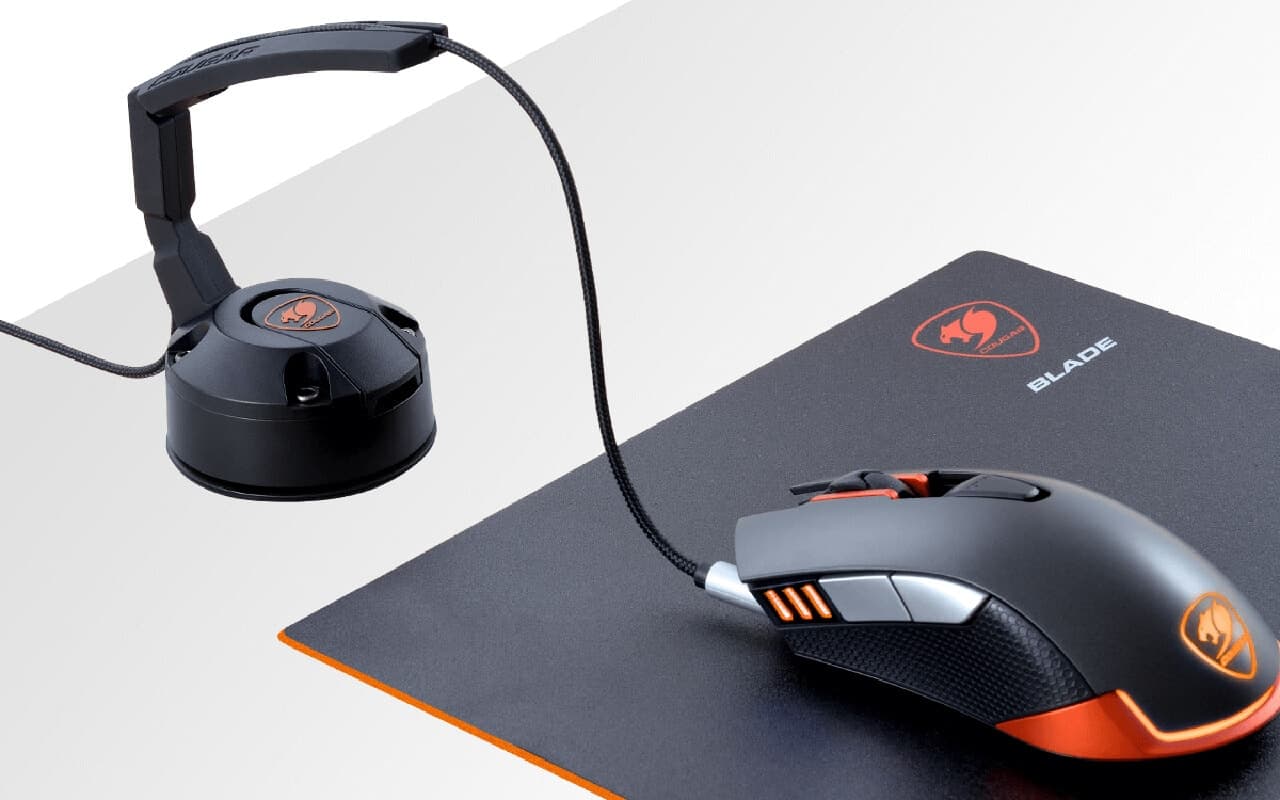
A mouse bungee does one thing: it holds your mouse cable up at a fixed point above the desk so the cable's weight and friction don't change as you move. Instead of dragging a cord across your mousepad — snagging on a keyboard corner or a stack of papers — the cable feeds from an elevated arm, so drag is constant and predictable instead of random.
That was a genuinely useful problem to solve in 2020. It's a smaller one now. Wireless gaming mice have taken over competitive play since then — the Logitech G Pro X Superlight 2 and Razer Viper V3 Pro are the closest things to consensus picks in the CS2 and Valorant pro scenes in 2026, and modern wireless receivers push polling well past what most players can perceive as lag. If you're buying a new gaming mouse today with no constraints, wireless is the default, not the compromise.
A bungee still earns its desk space for three groups: people running a budget wired mouse because the best wired options in a price tier still beat the wireless ones nearby, latency purists who don't want a receiver in the equation even if the practical difference is tiny, and anyone who's tired of a mouse dying mid-session because they forgot to charge it. If none of those describe you, skip this guide and go wireless instead.
Do you still need one in 2026?
Run the numbers before you buy anything:
- A mouse bungee costs roughly $10–$60 and works with any wired mouse you already own. It doesn't fix drag on cheap, stiff rubber cables as well as it fixes drag on braided or paracord-style cables, so pair it with a flexible cable if you can.
- A paracord-style aftermarket cable (often $10–$20 on its own) reduces drag by being lighter and more flexible than a stock rubber cable. It helps, but it doesn't eliminate drag the way lifting the cable off the desk does — the two solve overlapping, not identical, problems.
- A decent wireless mouse starts around $30–$40 for a mid-range model and $150+ for a flagship like the Superlight 2, and removes the cable entirely. No bungee, no cable choice, no drag — but you're now managing a battery and, for the cheaper end, sometimes a small input-lag penalty versus a wired connection.
If you already own a wired mouse you like, a $15–$20 bungee is the cheapest fix available. If you're mouse-shopping from scratch and have $50 to spend, a wireless mouse solves the same problem more completely — see our guide on connecting a wireless mouse if you go that route. One wrinkle worth knowing: several wireless mice, including the Viper V3 Pro, can be used wired while charging over USB-C. If you play long sessions and charge mid-match, a bungee still helps keep that charging cable out of your swing.
Two other routes sidestep the problem entirely rather than managing it. A trackball mouse doesn't get dragged across the desk at all, so there's no cable-drag problem to solve in the first place — worth a look in our best trackball mouse guide if you're open to a different input style. And if what's actually bothering you is click noise rather than cable drag, a bungee won't help — check our best silent mouse guide instead.
Quick comparison
| Bungee | Best for | Mount type | Typical price |
|---|---|---|---|
| Razer Mouse Bungee V3 Chroma | Best overall | Weighted base | ~$60 |
| BenQ Zowie CAMADE II | Best no-RGB / esports-style | Weighted base | ~$38 |
| Glorious Mouse Bungee | Best budget full-size | Weighted base | ~$20 |
| Cougar Bunker | Best for glass or uneven desks | Vacuum suction base | ~$20 |
| Hotline Games Mouse Bungee 3.0+ | Cheapest full-size option | Weighted base | ~$18 |
| Pulsar Micro Bungee ES | Best minimalist / monitor-mount | 3M adhesive mount | ~$12 |
How we picked
We checked current manufacturer product pages (Razer, BenQ Zowie, Glorious, Cougar, Pulsar) and cross-referenced listings on Amazon, Best Buy, Micro Center, and Newegg to confirm each model is still an active, in-stock SKU — not a discontinued product still lingering on old "best of" lists. This is not a hands-on test; we didn't run drag measurements ourselves, and any spec or claim below comes from the manufacturer or a cited source, not our own bench.
We also cut most of the previous version of this list. The original Razer Gaming Mouse Bungee v2, KLIM's bungee, AOBOR, Casethrone, ENHANCE's Pro and LED models, and the Thermaltake Tt eSPORTS Galeru are either discontinued or no longer reliably in stock at major retailers. We also looked at the VAXEE ORYZA, a well-regarded bungee with a rotating tip, but VAXEE posted a production suspension notice for it — once the last batch sells out, there's no restock — so we left it off a list meant to be buyable today.
The picks
1. Razer Mouse Bungee V3 Chroma — best overall
Who it's for: anyone who wants the most polished bungee available and doesn't mind paying for it.
The V3 Chroma pairs a rubber-coated cable catch with a weighted, rubber-gripped base and 8 individually addressable RGB zones controllable through Razer Synapse. Razer says the catch fits rubber, braided, and paracord-style cables, and the spring arm holds the cable elevated above the mousepad surface rather than letting it rest on it. It's sold directly through Razer.com as well as Amazon, Best Buy, and Micro Center.
Pros:
- Weighted, anti-slip base stays put during fast flicks
- Cable catch accommodates thicker braided and paracord cables, not just thin stock cords
- Widely stocked across major retailers, so it's easy to source a genuine unit
Con: it's the most expensive bungee on this list, and you're paying partly for RGB you don't need for the core function.
2. BenQ Zowie CAMADE II — best no-RGB / esports-style pick
Who it's for: players who want a bungee built like Zowie's other esports gear — no lighting, no gimmicks, just a stable arm.
Zowie's esports peripherals have a reputation for being deliberately plain, and the CAMADE II fits that mold: a weighted black-and-red base, an adjustable spring arm, and nothing that lights up. It's marketed as travel-ready and sold in multiple color variants (including a Divina blue/pink edition) through BenQ's own Zowie storefront, Amazon, Best Buy, Newegg, and Walmart.
Pros:
- Height-adjustable spring arm, the feature that made the original CAMADE a competitive-scene staple
- Weighted base with no lighting or software — nothing to configure, nothing to update
- Stocked across enough major retailers that genuine units are easy to find
Con: no RGB and no USB pass-through means it does exactly one job — fine if that's what you want, less appealing if you'd use a second USB port on your desk.
3. Glorious Mouse Bungee — best budget full-size pick
Who it's for: buyers who want a stable, full-size bungee without paying Razer or Zowie prices.
Glorious built its brand on value gaming gear, and this bungee follows the pattern: a flexible arm rated for gaming and braided cables, a weighted base, and a lower price than the premium picks above. It's sold through Glorious's own storefront as well as Amazon, Best Buy, Micro Center, and Walmart, in black and white.
Pros:
- Meaningfully cheaper than the Razer and Zowie picks while covering the same core job
- Flexible arm works with thicker aftermarket cables, not just thin stock cords
- Available in black or white to match a build
Con: the base is lighter than the Razer and Zowie models, so it's more likely to shift if you yank the cable hard.
4. Cougar Bunker — best for glass or uneven desks
Who it's for: anyone whose desk surface makes a rubber-footed base slide around — glass tops, laminate, or textured mats.
Instead of relying on weight and rubber feet, the Bunker uses a vacuum suction base that clamps onto the desk and releases via a pull tab. That solves a real problem the weighted bungees above don't: on a slick or glass surface, a merely-heavy base can still slide during a hard mouse flick. Cougar also sells an RGB version with a built-in two-port USB hub — worth knowing that hub runs USB 2.0, not 3.0, per third-party listings, so don't buy it expecting fast transfer speeds from a peripheral hub.
Pros:
- Vacuum mount holds firm on smooth or glass surfaces where weighted bases can creep
- Compact, lightweight body (Cougar lists it under 100 grams) for a bungee that stays this stable
- Sold through Cougar's own site plus Amazon, B&H, Adorama, and Newegg
Con: the suction base can leave a faint mark on textured or painted surfaces, and it needs to be re-primed occasionally to keep its grip.
5. Hotline Games Mouse Bungee 3.0+ — cheapest full-size option
Who it's for: budget buyers who still want a full weighted-base bungee rather than a minimalist clip.
Hotline Games built its name on inexpensive esports-adjacent accessories, and the 3.0+ is the clearest example: a counterweighted base (Hotline lists it around 220 grams), a retractable spring arm, and silicone anti-slip feet, all for less than half of what the Razer pick costs. It's sold on Amazon in several colors and through smaller retailers like iTakTech and AliExpress.
Pros:
- Full-size weighted base at a genuinely low price
- Retractable arm design is more travel-friendly than fixed-height bungees
- Available in enough colors to match most setups
Con: build quality and finish are noticeably a step below the Razer, Zowie, and Glorious picks — expect it to work, not to feel premium.
6. Pulsar Micro Bungee ES — best minimalist / monitor-mount pick
Who it's for: anyone who wants a bungee without giving up any desk or mousepad space.
The Micro Bungee ES ditches the weighted-base design entirely: it's a small polycarbonate housing with a flexible silicone tube that mounts to your monitor, desk edge, or any flat surface with included 3M VHB adhesive, then rotates 360 degrees to guide the cable. Pulsar markets it as the smallest bungee on the market, and at this price it's close to an impulse buy. It's sold through Pulsar's own site, Amazon, Micro Center, and MaxGaming.
Pros:
- Takes up zero desk or mousepad real estate since it mounts off-surface
- Cheapest bungee on this list by a wide margin
- 360-degree rotation keeps the cable exit point aligned with your hand regardless of mouse position
Con: the adhesive mount is semi-permanent — repositioning it after the 3M pad has set isn't as simple as picking up a weighted base and moving it.
What to look for
Weight and stability. A bungee only works if it stays put when you yank the cable during a fast flick. Weighted bases (Razer, Zowie, Glorious, Hotline Games) rely on mass and rubber feet; the Cougar Bunker uses vacuum suction instead, which is the better call on glass or slick surfaces where a merely-heavy base can still slide.
Arm flexibility and cable thickness. Not every bungee's cable catch fits every cable. Stock rubber mouse cables are thin; aftermarket braided and paracord-style cables are noticeably thicker and stiffer. Check that the catch or arm on your pick is rated for the cable you're actually using — a bungee sized for a thin stock cable can pinch or fight a thick paracord one.
Height. Too low and the cable still drags on the desk near the base; too tall and it becomes visual clutter in your peripheral vision. Adjustable-height arms (like Razer's and Zowie's) let you tune this; fixed-height budget bungees don't, so check the listed height before buying if your desk setup is unusual.
RGB and USB hubs — read the fine print. Several bungees, including RGB variants of the Cougar Bunker, add a small USB hub as a bonus feature. Before you factor that into your buying decision, check what USB version the hub actually runs — RGB bungee hubs are commonly USB 2.0, not 3.0, per the specs listed on retailer pages, which caps you well below modern flash-drive or external-SSD speeds. Treat it as a convenient spot to plug in a keyboard or headset dongle, not a fast data hub.
Frequently asked questions
Is a mouse bungee worth it? If you use a wired mouse and notice cable drag during fast movements, yes — it's a cheap, permanent fix. If you're mouse-shopping from scratch, a wireless mouse solves the same problem without a cable to manage at all, so weigh the bungee's low price against a wireless mouse's higher one before deciding.
Does a mouse bungee improve aim? Not directly. What it does is remove an inconsistent variable — cable snag and drag that changes depending on where your mouse is on the pad. Removing that inconsistency can make your movements feel more predictable, but the bungee isn't making you more accurate on its own; it's taking away a distraction.
Do pros use mouse bungees? Less than they used to. Wireless mice like the Logitech G Pro X Superlight 2 dominate current CS2 and Valorant pro-gear tracking (per prosettings.net's ongoing pro-settings database), which removes the need for a bungee entirely. Bungees still show up at LAN setups where players run wired mice or want a charging cable out of the way — but they're no longer the default they were in the wired-mouse era.
Can I make a DIY mouse bungee? Roughly — clip a binder clip to the edge of your desk or monitor and thread the cable through the wire handle to lift it off the pad; it's a rough approximation of what a Pulsar-style mount does, minus the adjustability and finish.
The final verdict
Start by asking whether you need a bungee at all: if you're free to buy any mouse, a wireless model removes the cable-drag problem completely and is the better long-term buy. If you're keeping a wired mouse — for budget reasons, latency preference, or because you hate charging peripherals — the Razer Mouse Bungee V3 Chroma is the best all-around pick, the BenQ Zowie CAMADE II is the move if you want Zowie's no-frills esports build without RGB, and the Glorious Mouse Bungee gets you most of the same stability for less money. Skip straight to the Cougar Bunker if your desk is glass or slick enough that a weighted base won't stay put, and consider the Pulsar Micro Bungee ES if you don't want to give up any desk space for the privilege.

Tech enthusiast and founder of Technize. Passionate about making technology accessible and helping people make smarter buying decisions.