Best Mini Keyboards in 2026: Wireless, Mechanical & HTPC
Disclosure: This post contains affiliate links. We earn a commission on purchases made through these links, at no extra cost to you.
"Mini keyboard" means three fairly different things depending on why you searched for it, so let's sort that out first.
- Compact wireless/Bluetooth keyboards for a desk or tablet. These drop the number pad (and sometimes more) to save space and pair over Bluetooth with a laptop, phone, or iPad.
- 60% and 65% mechanical keyboards for gaming and enthusiast desks. These strip the board down to the alpha keys, with or without arrow keys, usually for lower latency, more mouse room, or a smaller footprint on a battle station.
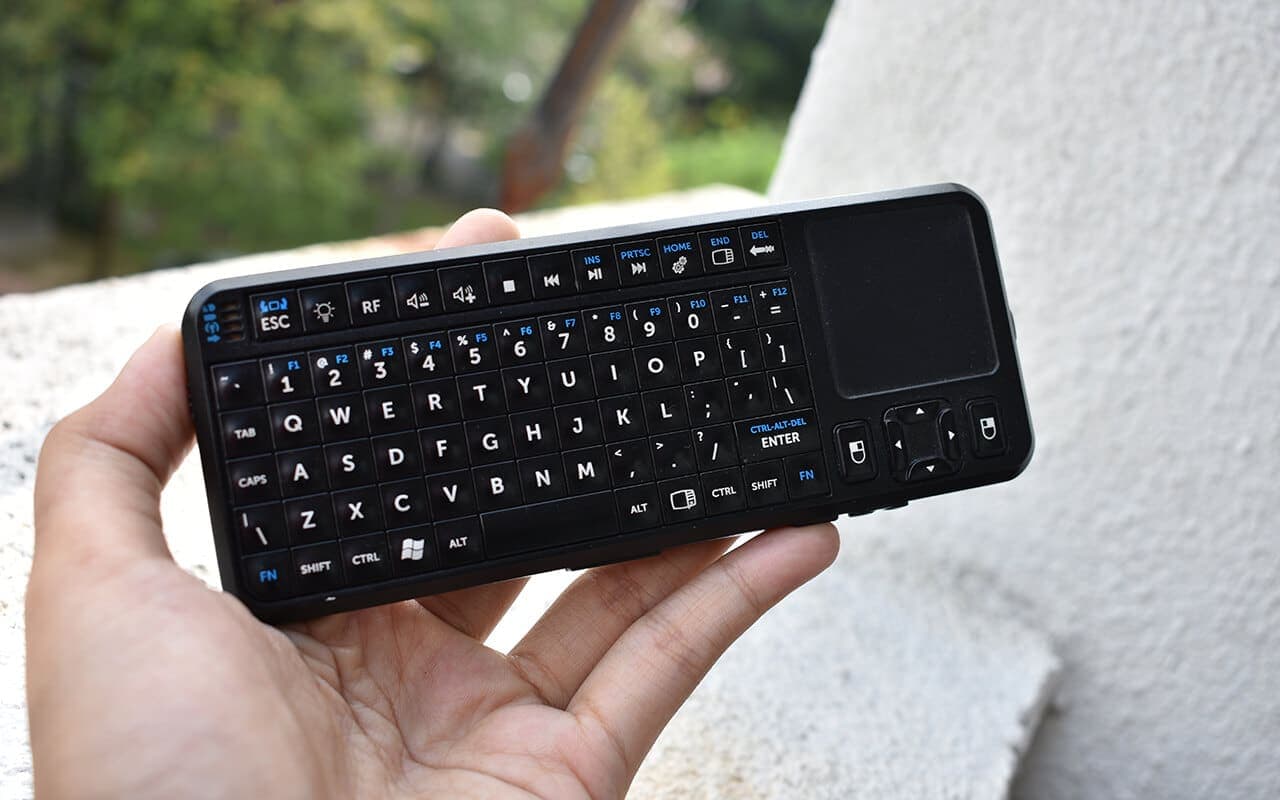
- Handheld keyboards with a built-in touchpad for a couch, TV, or HTPC/Raspberry Pi setup. These are meant to be used from a recliner, not a desk.
We picked from all three categories below, verified against each brand's own product pages as of mid-2026, and skipped anything we couldn't confirm was still actually sold. If you actually want a full-size keyboard with a number pad — the opposite of what's on this page — see our laptops with a full number pad roundup instead.
Quick comparison table
| Keyboard | Category | Connection | Best for |
|---|---|---|---|
| Logitech Pebble Keys 2 K380s | Compact wireless | Bluetooth, multi-device | Everyday desk/tablet typing |
| Logitech MX Keys Mini | Compact wireless | Bluetooth/2.4GHz, multi-device | Serious daily typists |
| Apple Magic Keyboard (USB-C) | Compact wireless | Bluetooth (pairs via USB-C) | Mac and iPad users |
| Keychron K6 / V4 | 65%/60% mechanical | Bluetooth + wired (K6), wired (V4) | Mac/Windows enthusiasts |
| Razer Huntsman Mini | 60% mechanical | Wired (USB-C) | Competitive gaming |
| Royal Kludge RK61 | 60% mechanical | Bluetooth/2.4GHz/wired | Budget mechanical |
| Logitech K400 Plus | Handheld/HTPC | 2.4GHz USB dongle | TV/HTPC couch use |
| Rii i4 | Handheld/HTPC | Bluetooth + 2.4GHz dongle | Budget Raspberry Pi/TV box |
How we picked
We started from the brand's own current product pages rather than the 2019 version of this list — several of the older picks (older Rii models, ANEWISH, ANEWKODI, REIIE, ILEBYGO, Enboard, MCSaite) no longer have live listings on their maker's own site, so we dropped them rather than recommend something that might be discontinued or a rebadge. Every keyboard below is confirmed on the manufacturer's own store or support pages as of July 2026. We also skipped Microsoft-branded keyboards; Microsoft exited keyboard hardware and licensed the line to Incase, whose "Designed by Microsoft" relaunch has had spotty in-stock status on some models, so we left that line off rather than send you chasing a "coming soon" listing.
1. Logitech Pebble Keys 2 K380s
The classic K380 has effectively been replaced by the Pebble Keys 2 K380s in Logitech's current lineup — same idea (slim, round-key, multi-device Bluetooth board), refreshed design and battery. It pairs with up to three devices and switches between them with a button press, which is the whole point if you bounce between a laptop, a tablet, and a phone.
Pros
- Multi-device Easy-Switch across Windows, macOS, iPadOS, Android, and Chrome OS
- Long battery life (Logitech rates it around three years on the included battery)
- Compact and light enough to toss in a bag
Who it's for: anyone who wants one keyboard for a laptop and a tablet without a dongle to keep track of.
2. Logitech MX Keys Mini
Logitech's higher-end line, aimed at people who type all day rather than occasionally. It keeps the sculpted, low-profile keycaps of the full-size MX Keys but trims the function row and number pad. Backlighting and a metal-reinforced base are the main things you're paying extra for over the Pebble Keys.
Pros
- Nicer keycap profile and stabilizers than most compact boards
- Backlit keys with proximity sensing
- Also connects to up to three devices
Who it's for: writers, developers, and anyone typing long documents who doesn't want to give up feel for size.
3. Apple Magic Keyboard (USB-C)
Apple's current Magic Keyboard line pairs over Bluetooth and charges/pairs via USB-C (Apple moved the whole lineup off Lightning). There's a compact model without Touch ID and a version with Touch ID for Apple silicon Macs; neither has a number pad in its smallest configuration, which is the point here.
Pros
- Tight, reliable Bluetooth pairing with Macs and iPads specifically
- Touch ID option unlocks and authorizes purchases without reaching for your phone
- Apple-grade build quality and long battery life
Who it's for: Mac and iPad users who want a keyboard that "just works" and don't mind paying Apple prices for it.
4. Keychron K6 / V4
Keychron's K6 (65%, with arrow keys) and V4 (60%, no arrows) are the enthusiast-friendly middle ground: hot-swappable switches, Mac/Windows key caps in the box, and — on the K6 — Bluetooth plus wired USB-C. They're widely reviewed and still listed as current models on Keychron's own site.
Pros
- Hot-swap switch sockets, so you're not stuck with the stock switches
- K6 does both Bluetooth and wired; V4 is a cheaper wired-only option
- QMK/VIA programmability on the Pro variants
Who it's for: people who want to try mechanical switches without committing to a full custom-keyboard build.
5. Razer Huntsman Mini
A 60% board built around Razer's optical switches, aimed squarely at competitive gaming rather than typing comfort. No arrow keys, no F-row — everything is accessed through a function layer. It's still listed as a current product on Razer's own site alongside the newer, pricier Huntsman V3 Pro Mini.
Pros
- Optical switches with fast actuation
- Small enough to leave a lot of desk room for low-sensitivity mouse swings
- Detachable USB-C cable
Who it's for: FPS players who want the smallest board that still feels like a "real" mechanical keyboard.
6. Royal Kludge RK61
The budget 60% mechanical staple. Tri-mode connectivity (Bluetooth, 2.4GHz dongle, and wired USB-C), hot-swappable switches, and a price well under the Razer and Keychron boards above. Build quality and switch feel are noticeably a step down from the pricier options, but it's a reasonable way to try a 60% layout cheaply.
Pros
- Bluetooth, 2.4GHz, and wired in one board
- Hot-swap switches for cheap upgrades later
- Among the cheapest legitimately mechanical 60% boards available
Who it's for: anyone testing whether they like a 60% layout before spending three times as much.
7. Logitech K400 Plus
Logitech's long-running HTPC keyboard: a wireless board with a built-in touchpad along the right side, connected via a single 2.4GHz USB dongle. It's an old design at this point, but it's still an active, current listing on Logitech's own site — which is more than we can say for most of its original 2019 competition.
Pros
- Touchpad built right into the keyboard, no separate mouse needed
- Long battery life, rated well over a year
- One dongle, plug-and-forget setup for a TV PC or HTPC
Who it's for: anyone driving a PC connected to a TV, or a media-center box, from a couch.
8. Rii i4
Rii is a small, mostly Amazon-native brand — its official site (riitek.com/riimall.com) exists and still lists current models including the i4, but don't expect much in the way of firmware updates or long-term support if something goes wrong. With that caveat, the i4 is a genuinely tiny backlit keyboard with a built-in touchpad, a 2.4GHz dongle, and Bluetooth, aimed at Android TV boxes, Raspberry Pi media centers, and similar couch setups.
Pros
- Very small and light, easy to stash next to a remote
- Backlit for dark rooms
- Cheap enough to keep a spare on hand
Who it's for: budget Raspberry Pi, Fire TV, or Android TV box setups where you just need basic text entry and cursor control occasionally.
Buying guide: sizes, layouts, and wireless
The size ladder. Keyboards shrink in steps, and each step removes a specific block of keys:
- Full-size — everything, including a number pad.
- Tenkeyless (TKL) — drops the number pad only.
- 75% — TKL, but compressed so the arrow cluster and F-row sit closer to the alphas.
- 65% — drops most of the function row but keeps arrow keys and a few navigation keys (Home/End/Delete).
- 60% — drops the arrow keys and F-row entirely; everything lives on a function (Fn) layer.
If you do a lot of spreadsheet or accounting work, a mini keyboard is the wrong tool — go the other direction and look at our laptops with a full number pad list instead. If you just want a quiet, precise pointer to pair with any of these boards, we also cover that in our best silent mouse roundup.
Wireless protocols. Bluetooth is convenient — no dongle to lose, and most Bluetooth compact keyboards can pair with 2–3 devices and switch between them with a button. It's the right choice for desk and tablet use. For gaming, a 2.4GHz USB dongle generally has lower and more consistent latency than Bluetooth, which is why most gaming-oriented 60%/65% boards default to wired or 2.4GHz rather than Bluetooth. Tri-mode boards like the RK61 give you both and let you pick per situation.
Battery vs. rechargeable. Office-focused compact boards (K380s, MX Keys Mini, K400 Plus) mostly run for months to years on a charge or a set of AA/AAA batteries. Gaming mechanicals are more of a mixed bag — some are wired-only with no battery at all, others use rechargeable batteries that need topping up every few days to weeks under heavy RGB use.
Frequently asked questions
Are mini keyboards good for typing?
For everyday typing — email, docs, browsing — yes; boards like the MX Keys Mini and Pebble Keys 2 use the same scissor/low-profile key mechanisms as their full-size siblings, so day-to-day feel doesn't really suffer. What you give up is the number pad and, on 60% boards, direct access to F-keys, arrows, and navigation keys, which matters more for spreadsheet-heavy or shortcut-heavy work than for plain typing.
What's the difference between 60% and 65%?
A 65% keyboard keeps a dedicated column of arrow keys (and usually Home/End/Delete/Page Up/Down) alongside the main alpha block. A 60% keyboard removes those too — arrows and navigation keys only exist behind a function-key combo. 65% is the more practical everyday layout; 60% is smaller but asks you to relearn a few habits.
Do mini keyboards work with smart TVs?
It depends on the connection type and the TV, not the "mini" label itself. Bluetooth keyboards can pair directly with TVs and TV boxes that support Bluetooth HID input (many Android TV and Google TV devices do). Keyboards that rely on a 2.4GHz USB dongle need a free USB port on the TV or streaming box, which not every smart TV has — check your specific TV's Bluetooth and USB support before buying rather than assuming.
The final verdict
For most people using a mini keyboard at a desk or with a tablet, the Logitech Pebble Keys 2 K380s is the easiest recommendation — cheap, reliable multi-device Bluetooth, and a design Logitech has been refining for years. If you want a real mechanical-switch feel without going full custom-build, the Keychron K6 is the best-supported option still current on the brand's own site. And if this is for a couch or TV setup, the Logitech K400 Plus is the safer long-term bet over the more obscure Rii boards, simply because Logitech's support and stock will still be there in a year.
Whatever you land on, pair it with a silent mouse if noise matters to you, and if you actually need a number pad for spreadsheet work, go read our laptops with a full number pad guide instead — a mini keyboard is the wrong tool for that job.

Tech enthusiast and founder of Technize. Passionate about making technology accessible and helping people make smarter buying decisions.