What Motherboard Do I Have? How to Check on Windows and Linux
Disclosure: This post may contain affiliate links. If you purchase through these links, we may earn a small commission at no extra cost to you.
On Windows 10 or 11, press Windows key + R, type msinfo32, and press Enter. In System Summary, look for BaseBoard Manufacturer and BaseBoard Product. Together, those two fields identify the board.
I last needed my motherboard model when I was upgrading from 32 GB to 64 GB of RAM. My Linux terminal reported ASRock and B450M Pro4. With that name I could look up the slot count and memory type before ordering. ASRock lists four DDR4 slots for this board. ASRock B450M Pro4 specifications
Find the BaseBoard fields in System Information
- Press Windows key + R.
- Type
msinfo32and press Enter. - On the first screen, find these three rows:
- BaseBoard Manufacturer: the brand (ASUS, MSI, Gigabyte, ASRock).
- BaseBoard Product: the model name. This is the one you need.
- BaseBoard Version: the hardware revision, when the manufacturer fills it in.
This is the method I use on Windows. There is nothing to install and nothing to remember beyond the one word.
If someone is helping you choose parts, send them those three rows.
Check your motherboard model with PowerShell
Open PowerShell from the Start menu and run this command.
Get-CimInstance Win32_BaseBoard | Select-Object Manufacturer, Product, Version
Read the Product column for the model. If an older guide suggests wmic baseboard and Windows says it cannot find WMIC, use the PowerShell command above. Microsoft documents the fields in its Win32_BaseBoard reference.
If you already use CPU-Z or HWiNFO
In CPU-Z, open the Mainboard tab. In HWiNFO, look under Motherboard. Both can show the model alongside the chipset and BIOS version. If you see only a chipset name such as B450, you still need the exact model to choose a BIOS file.
Find the motherboard model when Windows won’t start
If the PC reaches BIOS/UEFI setup, check its main or information screen for the model. Our guide lists the BIOS setup key for each brand.
If the desktop cannot reach setup, shut it down and unplug it before opening the case. Look for the model printed on the board.
- Look for the largest printed text, usually between the PCIe slots or beside the RAM slots. It reads like "B550M DS3H" or "PRO Z790-P WIFI".
- The manufacturer's logo is usually next to it or on a heatsink.
- Some brands, Gigabyte in particular, also print a revision such as "REV: 1.1" in a corner of the board. Note it down: BIOS files differ between revisions of the same model.
When Windows shows a code instead of a name
A short part number. On a Dell, HP or Lenovo, BaseBoard Product can be an internal board ID. For drivers or upgrade specifications, use System Model from the same System Summary screen to find the computer on the manufacturer's support site. If the model is ambiguous, enter the service tag or serial number on that site.
I spent a while trying to work out exactly what my dad's laptop was from what the machine reported and got nowhere. In the end I dug out the receipt, which had the full model on it. If the software gives you a code and the label has worn off, the receipt, the order confirmation email or the original box is often the quickest route.
"To Be Filled By O.E.M." or "Default string". The firmware is reporting a placeholder. For a custom desktop, check the board box, order history or printed model. For a laptop, start with the laptop model on the case label.
On a laptop
A laptop's motherboard is specific to that laptop, and you cannot swap it for a retail one. When a support page or an upgrade guide asks what you have, it means the laptop model. If you are checking because of a memory upgrade, our RAM Upgrade Checker looks up what your model supports directly.
Check your motherboard model on Linux
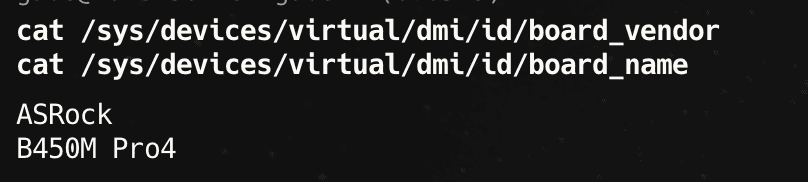
I use the terminal on Linux. On a PC that exposes DMI data, these commands print the manufacturer and model without requiring root access.
cat /sys/devices/virtual/dmi/id/board_vendor
cat /sys/devices/virtual/dmi/id/board_name
The first line on my PC reads ASRock, and the second reads B450M Pro4.
sudo dmidecode -t baseboard gives the full record, including the serial number.
Find the model on a Mac
For Apple support, use the Mac model. To find it, open Apple menu > About This Mac, or hold Option and choose System Information to see the Model Identifier.
What the model is for
Once you have the exact model, the manufacturer's support page for it answers most upgrade questions:
- CPU upgrades: the CPU support list shows which processors work and which BIOS version each one needs.
- Memory: the maximum capacity, the number of slots and the tested memory list. To see what is installed now, see what RAM do I have.
- Storage: how many M.2 slots there are and whether each one takes NVMe, SATA or both.
- BIOS and drivers: always download these for your exact model and revision. A BIOS file for a different revision can fail to flash or stop the board from booting. I have friends who ended up with blue screens after installing the wrong firmware, so check the model name twice before you flash anything.
To check the other parts in the same sitting, see what graphics card do I have and how to check your computer's specifications.
Frequently asked questions
Can I find my motherboard model without opening the case? Yes. Start with System Information or PowerShell. If the firmware gives you a placeholder, a receipt or board box can also supply the model.
Is the BaseBoard Product the same as the System Model? BaseBoard Product identifies the board. System Model identifies the whole computer. The values can match on a custom build, while a prebuilt can show a computer model and a separate board part number.
Does the motherboard model tell me which CPUs I can install? It tells you where to look. The socket and chipset decide what fits, and the board's CPU support list on the manufacturer's site gives the exact processors and the BIOS version each needs.
Why does my motherboard have two model names? Usually it is a name plus a revision, such as "B450M DS3H" and "rev. 1.0", or a retail name and a longer internal one. Use the name printed on the board when you search the manufacturer's site.

Tech enthusiast and founder of Technize. Passionate about making technology accessible and helping people make smarter buying decisions.
How we research and update guides